You opened a Python tutorial, saw the word “NumPy” everywhere, and now you’re stuck. What is NumPy?, and why does almost every data science course assume you already know it?
NumPy (short for Numerical Python) is a Python library that lets you work with large sets of numbers quickly and efficiently, using a special data structure called an array. It powers most of the number-crunching that happens behind the scenes in data science, machine learning, and scientific computing. If you’ve used pandas, scikit-learn, or TensorFlow, you’ve used NumPy without realizing it.
This guide breaks down what NumPy actually does, how it’s different from a regular Python list, and how to start using it in five minutes flat.
What is NumPy, Exactly?
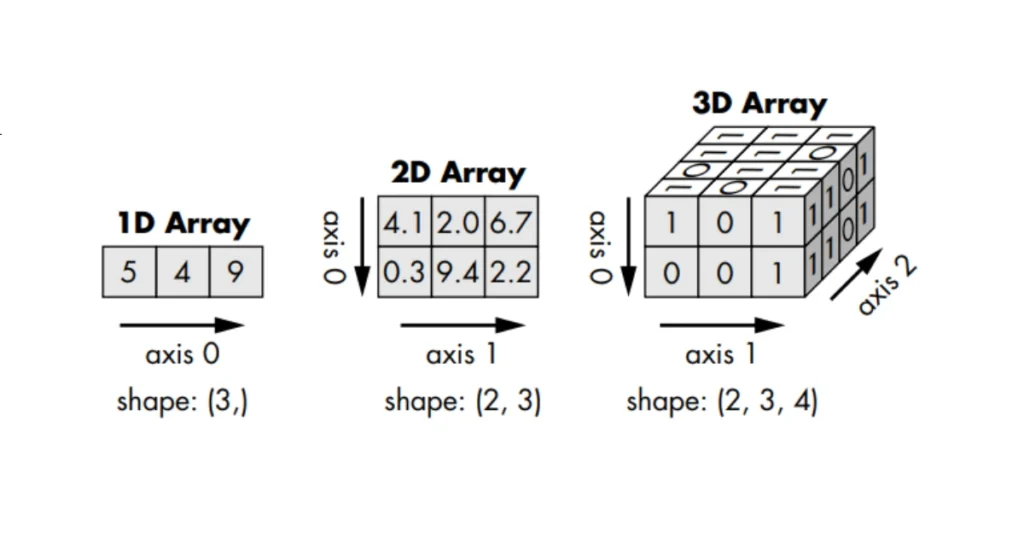
NumPy is an open-source Python library built for one job: handling numerical data at speed. At its center is the ndarray (n-dimensional array), a data structure that stores numbers in a grid and processes them using pre-compiled C code under the hood.
That last part matters more than it sounds. Python itself is slow at looping through large amounts of data, because it checks the type of every single element every time. NumPy sidesteps this by storing data in fixed types and running operations in bulk through optimized, low-level code. The result is math that runs 10 to 100 times faster than the same operation written in pure Python.
NumPy has been the backbone of Python’s scientific computing stack since 2006, and current versions (NumPy 2.x, actively maintained through 2026) continue to add performance improvements and better type support without breaking the core array interface that millions of projects depend on.
Takeaway: NumPy isn’t just “another library.” It’s the foundation that pandas, SciPy, scikit-learn, and most of the machine learning ecosystem are built on top of.
Why Not Just Use Python Lists?
A fair question. Python lists can hold numbers too, so why bother with a separate library?
Here’s the practical difference. A Python list can hold mixed data types (a string, an integer, and a float in the same list), which means Python has to check each element’s type individually during operations. A NumPy array holds one data type throughout, so operations run without that repeated overhead.
Try this yourself:
# Adding two lists doesn’t do math, it concatenates
list_a = [1, 2, 3]
list_b = [4, 5, 6]
print(list_a + list_b)
# Output: [1, 2, 3, 4, 5, 6]
# NumPy arrays do element-wise math
import numpy as np
arr_a = np.array([1, 2, 3])
arr_b = np.array([4, 5, 6])
print(arr_a + arr_b)
# Output: [5 7 9]
That single example is usually the moment it clicks for beginners. Lists were never built for math. NumPy arrays were.
Common mistake: New learners try to multiply or divide two Python lists directly and get a TypeError. If you’re doing any numerical operation across a dataset, that’s your sign you need an array, not a list.
Core NumPy Concepts You Need to Know
You don’t need to memorize the whole library. You need these five ideas, because everything else in NumPy builds on them.
- The ndarray The core object in NumPy. Think of it as a container for numbers that can be one-dimensional (a simple row), two-dimensional (a table with rows and columns), or higher.
- Shape Every array has a shape, which tells you its dimensions. A (3, 4) shape means 3 rows and 4 columns.
- dtype Every array has one fixed data type: integers, floats, booleans, and so on. This is what makes NumPy fast, since Python doesn’t need to check types element by element.
- Broadcasting NumPy’s ability to perform operations on arrays of different shapes without manually reshaping them. For example, adding a single number to an entire array applies that number to every element automatically.
- Vectorization Doing operations on entire arrays at once instead of looping through elements individually. This is the actual source of NumPy’s speed advantage.
If you only remember one thing from this section, remember vectorization. It’s the mental shift from “loop through each number” to “operate on the whole array at once,” and it’s the difference between writing Python that feels slow and Python that feels instant.
How to Install and Import NumPy
Installing NumPy takes one line in your terminal:
pip install numpy
If you’re using Anaconda, NumPy usually comes pre-installed. To check, or to import it into a script:
import numpy as np
print(np.__version__)
The as np part is a near-universal convention. Every NumPy tutorial, every Stack Overflow answer, and every codebase you’ll encounter uses np as the alias. Stick with it, since deviating just makes your code harder for others to read.
Practical tip: If pip install numpy fails on Windows with a compiler error, it’s almost always because you’re running an outdated pip version. Run pip install –upgrade pip first, then retry.
Basic NumPy Operations With Examples
Here’s what day-to-day NumPy usage actually looks like, starting from the basics.
Creating arrays
import numpy as np
a = np.array([1, 2, 3, 4])
b = np.zeros((2, 3)) # 2×3 array of zeros
c = np.arange(0, 10, 2) # [0 2 4 6 8]
d = np.linspace(0, 1, 5) # 5 evenly spaced numbers between 0 and 1
Indexing and slicing
arr = np.array([10, 20, 30, 40, 50])
print(arr[1]) # 20
print(arr[1:4]) # [20 30 40]
print(arr[-1]) # 50
Math operations
arr = np.array([1, 2, 3, 4])
print(arr * 2) # [2 4 6 8]
print(arr.mean()) # 2.5
print(arr.sum()) # 10
print(arr.max()) # 4
Reshaping
arr = np.arange(6)
reshaped = arr.reshape(2, 3)
print(reshaped)
# [[0 1 2]
# [3 4 5]]
Each of these replaces what would otherwise be several lines of manual looping in plain Python, and runs considerably faster on large datasets.
What is NumPy Used For in Real Projects?
NumPy shows up anywhere numbers need to move fast, in bulk. A few concrete examples:
- Data science and analytics: pandas DataFrames are built directly on top of NumPy arrays. Every .mean() or .sum() you call on a DataFrame is a NumPy operation underneath.
- Machine learning: scikit-learn, TensorFlow, and PyTorch all accept or convert data into NumPy-compatible arrays before training models.
- Image processing: an image is just a grid of pixel values, which is exactly what a NumPy array represents. Libraries like OpenCV read images directly as arrays.
- Scientific computing: physics simulations, signal processing, and statistical modeling all rely on NumPy for matrix and vector math.
- Financial modeling: calculating returns, running Monte Carlo simulations, and processing time series data across thousands of rows.
Direct takeaway: if your project involves more than a few hundred numbers and you’re doing any kind of repeated calculation, NumPy will almost always outperform plain Python loops, and it’s worth reaching for by default rather than as an afterthought.
Common NumPy Mistakes Beginners Make
Mistake 1: Looping through arrays manually
# Slow and defeats the purpose of NumPy
result = []
for x in arr:
result.append(x * 2)
Instead, vectorize it: result = arr * 2. This one habit change is responsible for most of the speed complaints beginners have with “slow NumPy code,” which is usually just un-vectorized code.
Mistake 2: Confusing np.array() shape errors Trying to combine arrays of mismatched shapes throws a ValueError. Before combining arrays, check .shape on each one.
Mistake 3: Copying vs. viewing Slicing a NumPy array often returns a view, not a copy. Modifying the slice modifies the original array too. If you need an independent copy, use .copy() explicitly.
original = np.array([1, 2, 3])
view = original[0:2]
view[0] = 99
print(original) # [99 2 3] — the original changed too
Mistake 4: Mixing data types accidentally Adding a string into a numeric array silently converts the whole array to a string dtype. Always check .dtype if operations start behaving unexpectedly.
NumPy vs Pandas vs Python Lists
| Feature | Python List | NumPy Array | Pandas DataFrame |
|---|---|---|---|
| Data types allowed | Mixed | Single, fixed | Mixed (per column) |
| Speed on large data | Slow | Fast | Fast (built on NumPy) |
| Best for | Small, mixed general data | Numerical computation, matrices | Labeled tabular data, analysis |
| Built-in math operations | No | Yes | Yes |
| Memory efficiency | Low | High | Moderate |
| Learning curve | Easiest | Moderate | Moderate to steep |
Direct verdict: use Python lists for small, general-purpose collections. Use NumPy when you’re doing numerical computation, especially with large datasets or matrix operations. Use pandas when you need labeled, tabular data with columns like a spreadsheet. Most real projects end up using all three, but NumPy is almost always the one running underneath the other two.
FAQ
What is NumPy in Python used for? NumPy is used for fast numerical computation, primarily through its array object. It handles everything from basic math on large datasets to complex linear algebra, and it’s the base layer that libraries like pandas and scikit-learn build on.
Is NumPy hard to learn for beginners? Not particularly, if you already know basic Python. The core concepts (arrays, shape, indexing) usually take a few hours to grasp. Getting comfortable with vectorization and broadcasting takes a bit longer, but it’s a matter of practice, not raw difficulty.
Do I need NumPy if I already know pandas? Yes. Pandas is built on top of NumPy, so understanding NumPy helps you understand what’s happening underneath a DataFrame, and gives you tools for numerical operations pandas doesn’t directly handle, like linear algebra or advanced array reshaping.
Is NumPy free to use? Yes. NumPy is open-source and free under the BSD license, for both personal and commercial projects.
What’s the difference between NumPy arrays and Python lists? NumPy arrays store one fixed data type and support fast, vectorized math operations. Python lists can hold mixed types but don’t support direct element-wise math and are slower for large-scale numerical work.
Can NumPy work with machine learning libraries? Yes. TensorFlow, PyTorch, and scikit-learn all either use NumPy arrays directly or convert data into a NumPy-compatible format before processing.
Conclusion
NumPy is the numerical engine running quietly under most of Python’s data science and machine learning tools. It gives you a fast, memory-efficient array structure, replaces slow manual loops with vectorized operations, and forms the foundation pandas, scikit-learn, and TensorFlow are all built on. If you’re learning Python for data work, NumPy isn’t optional background knowledge. It’s the first real building block.
Start small: install it, create a few arrays, run basic math on them, and get comfortable with shape and indexing before moving on to pandas or machine learning libraries. Once vectorization clicks, the rest of the ecosystem makes a lot more sense.

Sandeep Kumar is the Founder & CEO of Aitude, a leading AI tools, research, and tutorial platform dedicated to empowering learners, researchers, and innovators. Under his leadership, Aitude has become a go-to resource for those seeking the latest in artificial intelligence, machine learning, computer vision, and development strategies.