Google Lens is an AI-powered visual search tool that helps you understand the world around you using images. Instead of typing a description into a search engine, you can point your phone’s camera at an object, upload a photo, or select an existing image and let Google Lens analyze it.
- What Is Google Lens?
- How Does Google Lens Work?
- 1. Google Lens Captures or Receives an Image
- 2. AI Analyzes the Image
- 3. Lens Identifies Text, Objects, or Patterns
- 4. Google Connects the Image With Information
- 5. Lens Shows Relevant Results
- What Can Google Lens Do?
- Search for Objects and Products
- Identify Plants and Animals
- Translate Text
- Copy Text From Images
- Solve Math Problems
- Find Similar Images
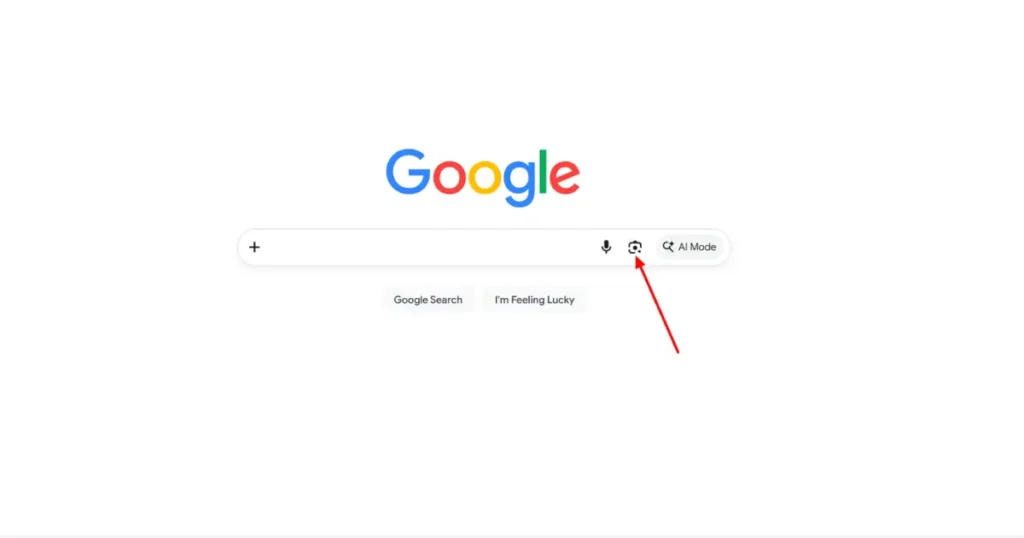
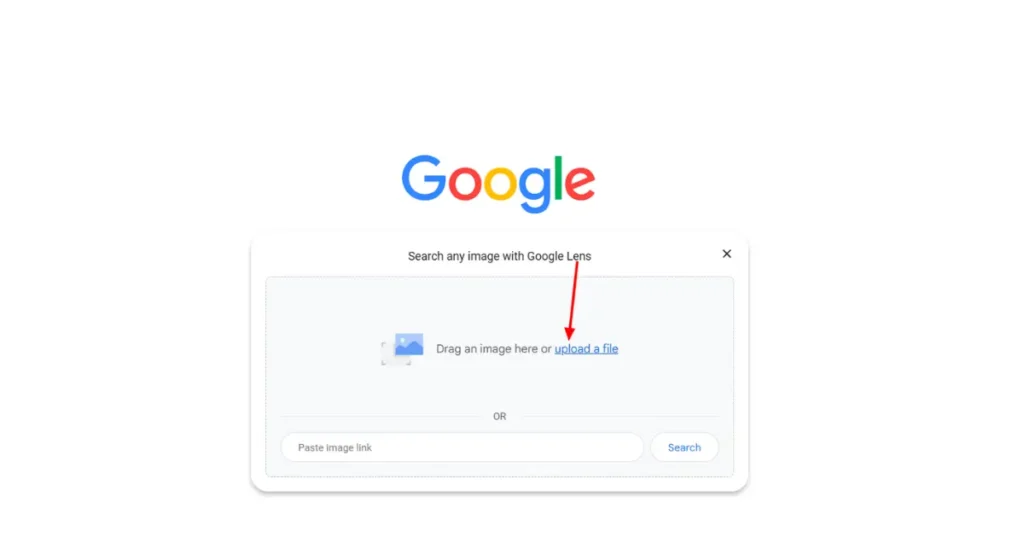
- How to Use Google Lens on Android and iPhone
- How to Use Google Lens on Android
- How to Use Google Lens on iPhone
- How to Get the Most Accurate Results
- What Is Google Lens Used For in Real Life?
- What Are the Limitations of Google Lens?
- Struggles With Obscure or Uncommon Objects
- Poor Performance in Low Lighting
- Inaccurate Translations or Math Help
- Limited Contextual Understanding
- Internet Dependency
- How Has Google Lens Evolved?
- Can Businesses Appear in Google Lens Results?
- Key Takeaways
- Frequently Asked Questions
- What is Google Lens used for?
- Is Google Lens free?
- Can Google Lens identify anything?
- Can Google Lens translate text?
- Can Google Lens copy text from a photo?
- Does Google Lens work on iPhone?
- Is Google Lens the same as Google Image Search?
- Can Google Lens identify plants?
- How accurate is Google Lens?
- Does Google Lens use AI?
- Can businesses optimize for Google Lens?
It can recognize objects, translate text, copy words from images, identify plants and animals, find similar products, and provide information about places and other visual subjects.
But how does Google Lens actually work, and what can you do with it? Let’s explore.
What Is Google Lens?
Google Lens is a visual search and image-recognition technology developed by Google. It uses artificial intelligence, computer vision, and machine learning to analyze the contents of images and provide relevant information.
Traditional search usually starts with words. Google Lens works differently. Instead of describing what you see, you can show it an image.
For example, if you see a plant you don’t recognize, you can point your camera at it. Google Lens can analyze the image and may identify the plant and provide related information.
A Simple Definition of Google Lens
In simple terms, Google Lens is a tool that lets you search and interact with information using images instead of words.
It can understand different parts of an image, including:
- Objects
- Text
- Products
- Plants
- Animals
- Buildings and landmarks
- Artwork
- Food
- Documents
The results depend on the image, available information, and the task you ask Lens to perform.
Who Made Google Lens and Why?
Google developed Google Lens to make search more visual and useful in everyday situations.
It was introduced in 2017 and initially focused on recognizing objects and providing information about what a camera was seeing. Over time, Google expanded its capabilities to include text recognition, translation, shopping, visual search, and other AI-powered features.
The broader idea is simple: people don’t always know the right words to describe what they see. Visual search allows them to start with the image itself.
What Can Google Lens Recognize?
Google Lens can analyze many types of visual information.
Depending on the image, it can recognize or work with:
- Written text
- Products
- Plants
- Animals
- Landmarks
- Artwork
- Books
- Food
- Clothing
- Documents
- Objects in everyday environments
Its accuracy can vary depending on image quality, lighting, the object itself, and the amount of information available online.
How Does Google Lens Work?
Google Lens combines computer vision, machine learning, image recognition, and Google’s search systems to understand images.
The exact technology behind the system is complex, but the basic process can be explained in a few steps.
1. Google Lens Captures or Receives an Image
First, Lens receives visual information.
You can use your phone’s camera to point at something in front of you, or you can select an existing photo.
The image becomes the input that Lens needs to analyze.
2. AI Analyzes the Image
Google Lens uses computer vision and machine learning models to examine the visual information.
Instead of seeing an image in the same way a person does, an AI system processes visual patterns and features within the image.
For example, it may detect shapes, colors, text, edges, objects, and other visual characteristics.
3. Lens Identifies Text, Objects, or Patterns
Next, the system determines what appears to be important in the image.
If you photograph a document, Lens may detect text.
If you photograph a product, it may identify the product or find visually similar products.
If you photograph an animal or plant, it may attempt to identify it.
4. Google Connects the Image With Information
After analyzing the image, Lens can use Google’s search and knowledge systems to find relevant information.
This is one of the reasons Google Lens is more than a simple image-recognition tool.
It connects what the camera sees with information that may already exist across Google’s search ecosystem.
5. Lens Shows Relevant Results
Finally, Lens presents information based on what it detected and what you are trying to accomplish.
Depending on the situation, the results might include:
- Search results
- Product information
- Translations
- Extracted text
- Similar images
- Information about an object
- Directions or information about a location
What Can Google Lens Do?
Google Lens has several practical uses beyond simply identifying objects.
Search for Objects and Products
You can point Google Lens at an unfamiliar object and search for information about it.
For products, Lens can sometimes help you find similar items online, compare visual matches, or discover additional information.
This can be particularly useful when you don’t know the product’s name.
Identify Plants and Animals
If you encounter an unfamiliar plant or animal, Google Lens can help you find possible matches.
For example, you could take a photograph of a flower and use Lens to search for visually similar results.
However, visual identification should not automatically be treated as definitive, especially when identification has important consequences.
Translate Text
Google Lens can recognize written text in images and translate it into another language.
This can be useful when traveling.
For example, you might point your phone at:
- A restaurant menu
- A road sign
- A product label
- A notice
- A printed document
Instead of typing the text manually, Lens can recognize it from the image.
Copy Text From Images
Lens can also extract text from photographs.
This is useful when you have information printed on paper but don’t want to type it manually.
You might use it to copy:
- Notes
- Addresses
- Phone numbers
- Book excerpts
- Instructions
- Documents
The accuracy depends on factors such as font, image quality, lighting, and whether the text is clearly visible.
Solve Math Problems
Google Lens can also assist with mathematical problems.
You can photograph an equation or mathematical question, and Lens may recognize the problem and provide relevant information or steps.
For complex problems, however, it is still important to verify the result rather than blindly accepting an AI-generated answer.
Find Similar Images
Visual search can help you discover images that look similar to the object or scene you’re searching for.
This is particularly useful when you know what something looks like but don’t know the right keywords to search for it.
How to Use Google Lens on Android and iPhone
Google Lens is available through Google’s apps and services, although the exact interface and available features can vary between devices.
How to Use Google Lens on Android
On compatible Android devices, you can generally access Lens through Google-related apps or your device’s camera experience.
A typical workflow is:
- Open Google Lens or an app that provides Lens access.
- Point the camera at the object or text.
- Keep the subject clearly visible.
- Select the relevant Lens option.
- Review the results.
You can also use Lens with an existing image instead of taking a new photograph.
How to Use Google Lens on iPhone
On iPhone, Google Lens can be accessed through Google’s apps that support the feature.
A typical process is:
- Open the relevant Google app.
- Select the Lens option.
- Take a picture or choose an existing image.
- Allow Lens to analyze the image.
- Review the visual search results.
The exact steps can change as Google updates its apps.
How to Get the Most Accurate Results
The quality of the image can significantly affect the results.
For better results:
- Use good lighting.
- Keep the object in focus.
- Avoid unnecessary objects in the frame.
- Move closer when appropriate.
- Capture text straight rather than at a sharp angle.
- Make sure important details are visible.
- Try another angle if the first result is incorrect.
If Lens gives an unexpected result, taking another photograph from a different angle can sometimes improve the analysis.
What Is Google Lens Used For in Real Life?
Google Lens can be useful in many everyday situations.
Real-World Use Cases
Imagine you’re traveling in another country and see a sign written in a language you don’t understand. Instead of typing the text manually, you can use Lens to analyze it.
Or perhaps you’re shopping and see a product you like but don’t know its name. A visual search can help you discover similar products.
Other practical examples include:
- Translating menus
- Copying text from paper
- Identifying objects
- Searching for products
- Learning about landmarks
- Identifying plants
- Finding similar images
- Extracting information from documents
Lesser-Known Google Lens Features
Many people think of Lens only as an object-identification tool, but its capabilities go further.
You can use visual search to interact with text in photographs, search for unfamiliar products, investigate visual subjects, and work with information that would otherwise require manual typing.
This makes Lens especially useful when describing something with words would be difficult or time-consuming.
What Are the Limitations of Google Lens?
Google Lens is powerful, but it isn’t perfect.
Understanding its limitations is important because visual recognition systems can sometimes produce incorrect or incomplete results.
Struggles With Obscure or Uncommon Objects
Lens tends to work better when the subject has recognizable visual characteristics and there is enough information available to match it.
Very unusual objects may produce irrelevant or broad results.
Poor Performance in Low Lighting
Dark, blurry, or poorly exposed images can make visual recognition more difficult.
If the object is hard for a person to see clearly, an AI system may also struggle to identify it.
Inaccurate Translations or Math Help
Text recognition and translation can sometimes contain errors, especially when the image contains unusual fonts, handwriting, poor lighting, or complicated layouts.
Math-related results should also be checked rather than automatically treated as correct.
Limited Contextual Understanding
An image can contain multiple possible interpretations.
For example, a photograph may show an object, a location, people, and surrounding context at the same time.
Lens may focus on the wrong part of the image or misunderstand what you actually want to know.
Internet Dependency
Many Lens features rely on online services and search infrastructure.
As a result, connectivity can affect what information is available and how quickly results appear.
How Has Google Lens Evolved?
Google Lens has changed significantly since its introduction.
Early versions focused heavily on visual recognition and object identification. Google gradually added features involving text, translation, shopping, search, and other forms of visual interaction.
The evolution of Lens reflects a larger change in search itself.
Search is no longer limited to typing keywords into a search box. Users can increasingly combine text, images, voice, and other forms of input.
The Role of AI and Machine Learning in Google Lens
AI and machine learning are fundamental to visual search.
Machine learning models can be trained to recognize patterns in images and distinguish between different visual concepts.
Modern AI systems can also work with multiple types of information, allowing visual inputs to be connected with text and search results.
This helps make Lens more useful for tasks where an image alone isn’t enough.
Can Businesses Appear in Google Lens Results?
Businesses can benefit from visual search, particularly when they sell products or operate in visually distinctive categories.
However, appearing in visual search is not something businesses can guarantee simply by adding an image.
The fundamentals of SEO still matter.
Businesses should focus on:
- High-quality images
- Descriptive image filenames
- Useful alt text
- Accurate product information
- Relevant page content
- Structured data where appropriate
- Fast-loading pages
- Mobile-friendly experiences
A Quick List to Help Your Product Appear in Visual Search
If you sell products online, make sure your product images are:
- Clear and high quality
- Properly sized
- Relevant to the product
- Accompanied by useful descriptions
- Consistent with the actual product
- Supported by strong surrounding page content
Visual search is only one part of modern search optimization. Strong technical SEO, useful content, product information, and overall website quality remain important.
Key Takeaways
Google Lens is an AI-powered visual search technology that allows users to search and interact with information using images.
Its major capabilities include:
- Identifying objects
- Recognizing text
- Translating text
- Extracting text from images
- Searching for products
- Finding similar images
- Identifying plants and animals
- Providing information about visual subjects
Google Lens works by analyzing visual information with AI and computer vision, identifying relevant elements, and connecting them with information available through Google’s search systems.
Its results can be extremely useful, but they are not always perfect. Image quality, lighting, context, and the availability of relevant information can all affect accuracy.
As search becomes increasingly multimodal, tools like Google Lens demonstrate how people can search for information without relying entirely on written keywords.
Frequently Asked Questions
What is Google Lens used for?
Google Lens is used for visual search and image-based tasks such as identifying objects, translating text, extracting text, finding products, and searching for visually similar information.
Is Google Lens free?
Google Lens is generally available as part of Google’s supported apps and services without a separate Lens subscription. Specific features and availability can vary by device, app, region, and account.
Can Google Lens identify anything?
No. Google Lens cannot identify every object accurately. Its results depend on image quality, the subject, context, and the information available to Google’s systems.
Can Google Lens translate text?
Yes. Google Lens can recognize text in images and provide translation for supported languages.
Can Google Lens copy text from a photo?
Yes. Lens can recognize text in images and allow users to interact with or copy the detected text.
Does Google Lens work on iPhone?
Yes. Google Lens is available on iPhone through supported Google apps and services. The exact interface can vary depending on the app and current version.
Is Google Lens the same as Google Image Search?
They are related but not identical. Google Image Search traditionally allows users to search using text and images, while Google Lens is designed specifically around understanding and interacting with visual content.
Can Google Lens identify plants?
Google Lens can help identify many plants by analyzing their visual characteristics. However, its identification should be treated as an indication rather than guaranteed expert identification.
How accurate is Google Lens?
Accuracy varies. Clear, well-lit images of common subjects generally provide better results, while blurry images, unusual objects, poor lighting, and ambiguous scenes can make identification more difficult.
Does Google Lens use AI?
Yes. Google Lens relies on AI and machine-learning technologies to analyze visual information and provide relevant results.
Can businesses optimize for Google Lens?
Businesses can improve their visual discoverability by using high-quality images, accurate product information, descriptive text, appropriate structured data, and strong overall SEO. However, there is no guaranteed method to appear in every Lens result.

Sandeep Kumar is the Founder & CEO of Aitude, a leading AI tools, research, and tutorial platform dedicated to empowering learners, researchers, and innovators. Under his leadership, Aitude has become a go-to resource for those seeking the latest in artificial intelligence, machine learning, computer vision, and development strategies.