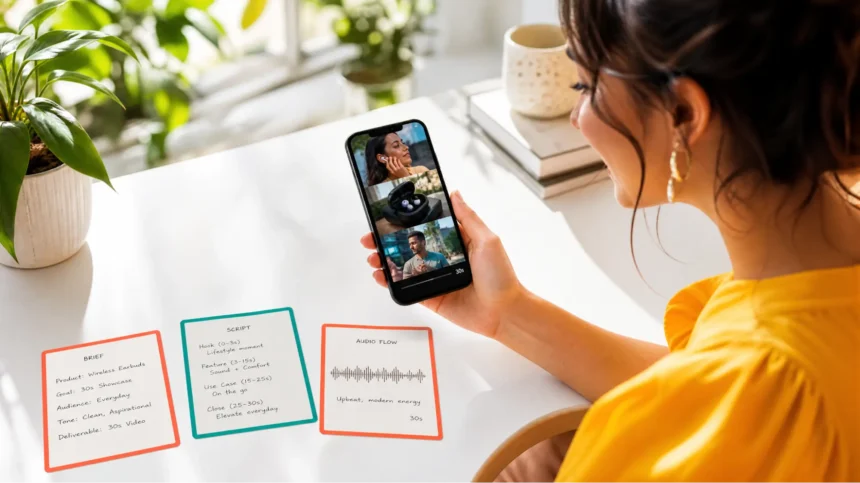
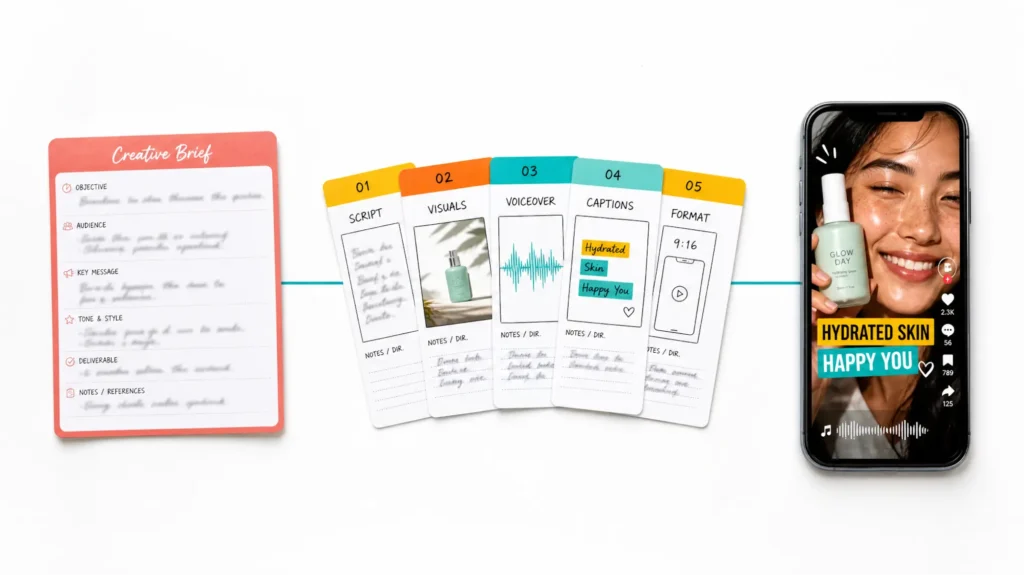
AI video agents are the next evolution beyond simple video generators. Instead of just converting a prompt into a clip, a true AI video agent understands your intent, plans a multi-step workflow, handles scriptwriting, visual generation, voiceover, editing, and formatting — then delivers a finished video with minimal human input.
- What Makes a “True” AI Video Agent?
- Best AI Video Agents: At a Glance
- #1. DeeVid AI Video Agent: Best for End-to-End AI Video Creation
- #2. invideo Agent: Best for Complete Agentic Video Production
- #3. TopView AI: Best AI Video Agent Overall
- #4. Medeo AI: Best for Chat-Driven Storytelling
- #4. Veed AI: Best for UGC-Style Agent Workflows
- #5. Synthesia: Best for Corporate Training & Explainers
- #7. Vidfly AI: Best for One-Click Short-Form Agent
- #8. Pictory: Best for Blog Repurposing Agent
- #9. Fliki: Best for Voice-First Video Agent
- #10. Kapwing: Best for Social Media Editing Agent
- #11. Canva AI: Best for Simple Video Automation
- Which AI Video Agent Should You Use: My Personal Take
- FAQs
Think of it this way: a video generator is a tool. A video agent is a collaborator.
I’ve been following this space closely, and 2026 is the year AI video agents went from “interesting concept” to “genuinely useful.” But here’s the thing — most tools claiming to be “AI video agents” are really just video generators with a chat interface slapped on top. They promise a limitless AI Canvas for your imagination, but the difference between a real agent and a fancy chatbot matters.
So I tested 20 AI video agents over three weeks, feeding them real business briefs, content strategies, and creative challenges. I ranked them based on how well they understood intent, how autonomously they executed, and how publish-ready the final output was.
Here are the 10 best AI video agents I’d actually recommend — starting with TopView AI.
TopView AI is the best AI video agent overall for its ability to go from a simple brief to a publish-ready video with minimal human input. Its agent handles scripting, visual generation (using top-tier AI models like Seedance 2.0 and Veo 3.1), voiceover, transitions, and formatting automatically. Other strong picks include Medeo AI for chat-driven storytelling, InVideo AI for URL-to-video automation, and Veed AI for UGC-style agent workflows.
What Makes a “True” AI Video Agent?
Before jumping into the rankings, let me clarify what separates a real AI video agent from a glorified template tool. A true AI video agent should:
- Understand intent, not just prompts: You say “make a product launch video for my skincare brand targeting Gen Z on TikTok.” The agent should infer the tone, format, length, and visual style — not ask you to specify every parameter.
- Plan multi-step workflows: A single video involves scripting, visual creation, voiceover, music selection, captioning, and formatting. A real agent orchestrates all of these steps without you managing each one manually.
- Generate, not just assemble: Agents that simply search stock libraries and stitch clips together are editors, not agents. A true agent should create original content when needed.
- Iterate intelligently: When you say “make the intro more punchy,” the agent should understand what “punchy” means in context — faster pacing, stronger hook, louder music — not just randomly adjust one variable.
- Deliver publish-ready output: The final video should be ready to post. Proper aspect ratio, captions, music levels, and formatting for the target platform.
Most tools fail on at least two of these criteria. The ones that pass? Those made my list.
Best AI Video Agents: At a Glance
| Tool | Best For | Pricing | Agent Quality | Weakness |
| DeeVid AI Video Agent | End-to-end AI video creation | Free credits available; paid plans from $14/mo | ⭐⭐⭐⭐⭐ | Advanced models can use credits quickly |
| InVideo Agent | URL-to-video automation | ~$17-25/mo | ⭐⭐⭐⭐ | Template-heavy output |
| TopView AI | Best overall | Free plan available | ⭐⭐⭐⭐⭐ | Premium features need paid plan |
| Medeo AI | Chat-driven storytelling | ~$6-39/mo | ⭐⭐⭐⭐ | Needs multiple iterations |
| Veed AI | UGC-style agent workflow | ~$12/mo | ⭐⭐⭐⭐ | Limited raw generation |
| Synthesia | Corporate training/explainers | ~$29/mo | ⭐⭐⭐⭐ | Not TikTok-native |
| Vidfly AI | One-click shorts | Varies | ⭐⭐⭐ | Inconsistent quality |
| Pictory | Blog-to-video repurposing | ~$19/mo | ⭐⭐⭐ | Stock footage only |
| Fliki | Voice-first video creation | ~$28/mo | ⭐⭐⭐ | Limited visual creativity |
| Kapwing | Social media editing agent | ~$16/mo | ⭐⭐⭐ | More editor than creator |
| Canva AI | Simple video automation | Free tier available | ⭐⭐ | Very basic agent capabilities |
#1. DeeVid AI Video Agent: Best for End-to-End AI Video Creation
DeeVid AI Video Agent feels less like a standalone video generator and more like handing a creative brief to an AI production team. You can start with a simple prompt or give it reference images, videos, audio, documents, or URLs, and the agent turns that context into a complete creative workflow instead of making you build every scene manually.
What makes DeeVid stand out is how much of the production process happens in one place. The agent can understand the brief, plan the content, generate visuals, create voice and music, and iterate on the result based on natural-language feedback. It also works across multiple leading generation models, including Veo 3.1, Sora 2, Kling, Runway, Hailuo, and others, automatically matching different models to different creative tasks.
The workflow is especially useful when you want to move beyond one-off AI clips. You can start the project with DeeVid Agent, refine individual visuals or scenes in Canvas, and finish the video in the built-in Editor without constantly exporting assets between separate tools. That makes it a strong option for social videos, product ads, explainers, branded content, and creators who want a more complete idea-to-publish workflow.
DeeVid also gives new users free credits to try the platform before subscribing. The main limitation is that free generations include a watermark, and more ambitious projects or premium models can use credits quickly. But for creators who want an AI agent that can handle both generation and production rather than simply returning a short clip, DeeVid is one of the most complete options on this list.
Pros:
- True end-to-end agent workflow from idea to finished video
- Accepts text, images, video, audio, documents, and URLs as creative input
- Access to multiple leading AI video and image models
- Handles video, images, avatars, voice, and music in one workflow
- Agent, Canvas, and Editor work together for creation and refinement
- Free credits available for new users
Cons:
- Free video generations include a watermark
- Advanced models and larger projects can consume credits quickly
- Some complex creative briefs may still need manual refinement
#2. invideo Agent: Best for Complete Agentic Video Production
invideo agent works like a creative production partner that helps turn a brief, script, or set of references into a complete video project. Instead of only generating individual clips, it supports the full workflow – developing ideas, planning scenes, creating visuals, adding voice, music, captions, and refining the final video.
The agent can work from different types of references, including images, videos, PDFs, scripts, YouTube links, and Drive files. These inputs become part of the project context, helping maintain consistency across characters, products, visual style, and creative decisions.
Creators can direct changes conversationally instead of rebuilding the project manually. For larger productions, invideo agent can also work with specialised expert agents that handle different creative roles while sharing the same project context.
Pros:
- Handles the complete AI video production workflow
- Understands multiple types of creative references
- Maintains consistency across scenes and revisions
- Supports different AI models for creative production
- Useful for ads, explainers, brand videos, and social content
Cons:
- Complex projects may require more creative direction
- Larger productions may need more review and refinement time
- Available features depend on the selected plan
#3. TopView AI: Best AI Video Agent Overall
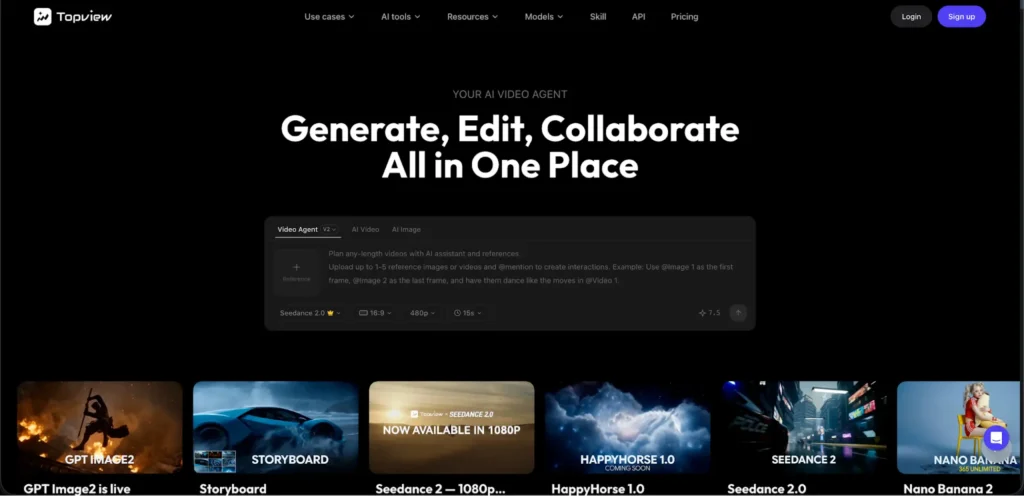
I’ve tested a lot of so-called “AI video agents,” and TopView AI is the only one that genuinely feels like working with a creative collaborator rather than wrestling with a tool.
Here’s what makes TopView AI’s agent capability stand out: it doesn’t just generate a single video clip from a prompt. It plans and executes a full creative workflow — understanding your brief, writing a script with proper hooks and pacing, generating original visuals using AI models like Seedance 2.5 in Topview selecting music and voiceover, handling transitions, and delivering a publish-ready video.
I tested it with a real-world scenario: “Create a 30-second TikTok product showcase for a wireless earbud brand targeting young professionals.” I gave it a reference product image and nothing else.
The agent:
- Wrote a script with a strong hook, three feature highlights, and a CTA
- Generated original AI footage of the earbuds in lifestyle scenarios — commuting, gym, office
- Added smooth transitions between scenes
- Layered in a professional voiceover with background music, powered by Seed Audio 1.0.
- Applied auto-captions in TikTok’s native style
- Exported in 9:16 vertical format
The result? A genuinely publish-ready product video in under 5 minutes. No manual editing required. I’ve had real video editors take 2-3 hours to produce similar quality.
But what really sets TopView AI apart from other agents is the breadth of its creative suite:
- Creative Studio: Text-to-video, image-to-video, reference-based generation across multiple AI models
- Marketing Studio: Agent-driven ad creation from product briefs — the agent understands ad structure, hooks, and CTAs
- Commerce Studio: Product showcase generation, virtual try-ons, commercial visuals — all agent-assisted
The viral video cloning feature also deserves mention. I showed the agent a trending TikTok and asked it to create a similar video for a different product. It analyzed the original’s pacing, transitions, and hook structure, then recreated the format with new AI-generated content. For trend-chasing on TikTok, this is incredibly powerful.
And the AI avatar feature rounds out the agent experience — when my content needed a talking-head presenter, the agent seamlessly incorporated lip-synced avatar footage without me switching to a separate tool.
Pros:
- True agent behavior — understands intent, plans workflow, executes autonomously
- Multiple top-tier AI models (Seedance 2.0, Veo 3.1, Kling 3.0, Sora 2)
- Generates original footage, not stock clips
- Three specialized studios (Creative, Marketing, Commerce)
- Viral video cloning and AI avatar integration
- Free plan available
Cons:
- Premium model access requires paid plan
- Complex briefs may need one round of feedback
- Agent takes a few minutes per video (not instant)
#4. Medeo AI: Best for Chat-Driven Storytelling
Medeo AI’s entire interface is a chat window, and that’s both its biggest strength and its limitation. For storytelling-focused content — educational TikToks, narrative explainers, brand stories — the conversational approach feels natural.
I tested it by pasting a product brief and saying: “Turn this into a 45-second storytelling TikTok that hooks viewers in the first 2 seconds.” The agent broke my brief into a narrative arc, scripted voiceover, selected scenes, set camera movements, and rendered a draft.
The iterative editing through chat is genuinely convenient. “Make the third scene more dramatic,” “slow down the outro,” “add a text overlay for the price” — the agent handled each request naturally.
Where Medeo AI falls short is consistency. I often needed 3-4 rounds of iteration before the output matched my vision. The visuals can feel generic, and the agent sometimes makes creative choices that miss the mark. But when it nails it, the results are impressive.
Pros:
- Intuitive chat-based workflow
- Good narrative and storytelling capabilities
- Natural language editing — “make it more punchy” actually works
- Handles multi-scene storyboarding
Cons:
- Requires 3-4 iterations for best results
- Inconsistent visual quality
- Limited model selection compared to TopView AI
- Slower workflow due to iteration cycles
#4. Veed AI: Best for UGC-Style Agent Workflows
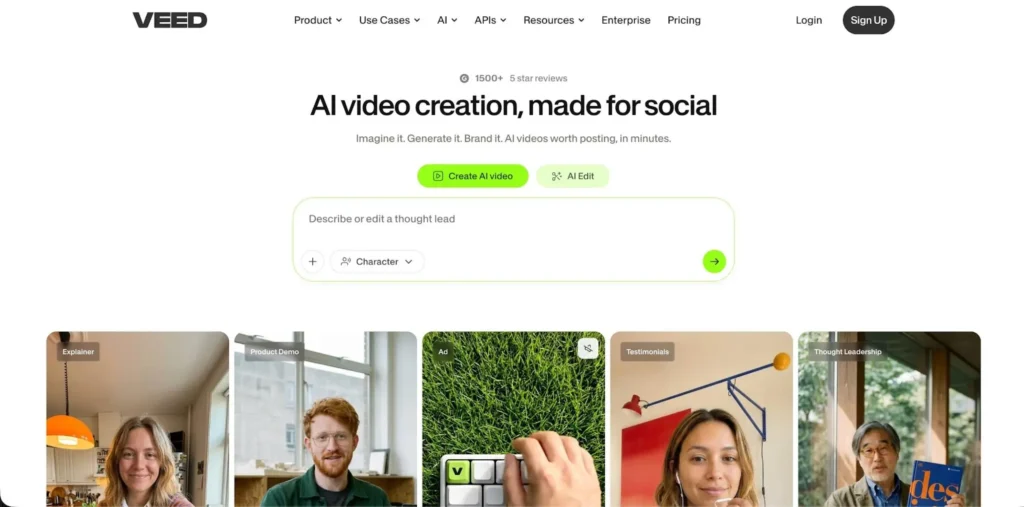
Veed AI’s agent shines in a specific lane: UGC-style content production. Its AI avatar library is one of the most realistic I’ve tested, and the agent workflow for creating promotional, review-style, and testimonial TikToks is remarkably smooth.
I tested it by giving the agent a product description and asking for a “creator-style product review TikTok.” It selected an appropriate AI avatar, wrote a natural-sounding script, recorded the avatar with lip-sync, added product B-roll from stock, and applied auto-captions.
The output genuinely looked like a real creator made it. On TikTok, where authenticity drives engagement, this matters. For brands and marketers, Veed AI’s agent is the fastest path to UGC-style content without hiring actual creators.
The editing agent is well-optimized for social — vertical formatting is default, subtitles are accurate, and branding elements (logos, colors, CTAs) can be added in seconds.
Where it falls short: anything beyond UGC-style content. The agent can’t generate cinematic footage, creative animations, or anything that requires original AI video generation beyond avatar talking-heads.
Pros:
- Excellent UGC-style AI avatars
- Agent handles end-to-end UGC production
- Accurate auto-captions and social formatting
- Good for brand/marketing content
Cons:
- Limited to UGC and stock-footage-based content
- Can’t generate original AI footage
- Not suited for creative or cinematic content
- Stock footage feels repetitive at volume
#5. Synthesia: Best for Corporate Training & Explainers
Synthesia’s agent is purpose-built for professional and educational content. If you need to convert training documents, SOPs, or educational materials into video, Synthesia handles this use case better than any other tool.
The agent accepts text input, automatically structures it into a presentation format, assigns an AI avatar presenter, generates slides and visuals, and produces a polished explainer video. With 230+ avatars and 140+ languages with lip-sync, it’s the most globally capable agent for corporate use.
For TikTok specifically? It struggles. The output is too polished, too corporate, too structured for a platform that rewards raw, authentic, trend-aware content. But for LinkedIn, internal training, course content, and professional presentations, Synthesia’s agent is best-in-class.
Pros:
- 230+ realistic AI avatars
- 140+ languages with lip-sync
- Excellent for corporate and educational content
- Agent handles document-to-video conversion
Cons:
- Too corporate for TikTok/social
- No free plan
- Expensive pricing
- Limited creative control over visual style
#7. Vidfly AI: Best for One-Click Short-Form Agent
Vidfly AI’s agent is the simplest on this list — and that’s by design. Select your preferences, paste a script, and the agent handles everything else. For creators who want zero learning curve, this simplicity is the selling point.
The long-to-short video conversion agent is particularly useful. Feed it a long-form video, and it extracts the most engaging segments for short-form platforms automatically.
However, the agent’s decision-making is basic compared to TopView AI or Medeo AI. It follows templates more than it thinks creatively, and the output quality is inconsistent. Some videos looked polished; others felt clearly AI-generated in a negative way.
Pros:
- Dead-simple one-click workflow
- Long-to-short video conversion agent
- Fast generation
- Beginner-friendly
Cons:
- Inconsistent output quality
- Template-driven rather than truly intelligent
- Limited creative control
- Agent doesn’t iterate well on feedback
#8. Pictory: Best for Blog Repurposing Agent
Pictory’s agent specializes in one workflow: turning long-form written content into short video summaries. It automatically identifies key sentences, builds a storyboard, matches stock visuals, and produces a captioned video.
For bloggers and content marketers who want to systematically convert their written archives into social video, Pictory’s agent is efficient and reliable.
The brand kit feature means every video maintains consistent visual identity — fonts, colors, logos — without manual configuration. For faceless channels building a brand, this consistency matters.
But the agent’s creative ceiling is low. It only works with stock footage, the output feels corporate, and it can’t handle anything that requires original visual creation.
Pros:
- Efficient blog-to-video conversion
- Brand kit for visual consistency
- Reliable text summarization
- Good for systematic content repurposing
Cons:
- Stock footage only
- Corporate-feeling output
- Low creative ceiling
- Agent doesn’t handle creative briefs well
#9. Fliki: Best for Voice-First Video Agent
Fliki’s agent leads with voiceover — and that’s where it excels. With 2,000+ AI voices across 80+ languages, the agent produces some of the most natural-sounding narration I’ve tested.
The workflow is voice-first: write or paste your script, the agent generates voiceover, then matches visuals to the narration timing. For commentary, explainer, and narration-driven content, this approach produces well-paced results.
The agent handles scene matching, caption generation, and music selection automatically. For podcast clips, voice-over TikToks, and audio-driven content, Fliki’s agent delivers.
Visual creativity is its weakness. The agent pairs excellent voiceovers with generic stock footage, which limits the overall impact.
Pros:
- 2,000+ ultra-realistic AI voices
- Voice-first workflow produces better audio pacing
- 80+ language support
- Good for narration-driven content
Cons:
- Stock footage dependency
- Limited visual creativity
- Agent can’t generate original footage
- Not ideal for visually-driven content
#10. Kapwing: Best for Social Media Editing Agent
Kapwing’s AI agent is more of an editing assistant than a video creator — but for post-production workflows, it’s genuinely useful.
The agent handles auto-captioning, format resizing, background removal, audio cleanup, and smart trimming. I used it as a finishing tool after generating raw footage with TopView AI — the two tools complement each other well.
The collaborative workspace makes Kapwing great for teams. Multiple people can use the agent’s editing features on the same project simultaneously.
But on its own, Kapwing’s agent can’t create videos from scratch. It needs imported footage to work with, which limits its value as a standalone AI video agent.
Pros:
- Excellent editing agent capabilities
- Auto-captions, resizing, smart trimming
- Collaborative team workspace
- Good companion tool for AI generators
Cons:
- Can’t generate videos from scratch
- Needs imported footage
- Basic AI generation capabilities
- Not a standalone video agent
#11. Canva AI: Best for Simple Video Automation
Canva’s AI features provide basic video automation — template-based slideshows, simple animations, and text-to-visual generation. For creators who need quick, simple video content without learning new tools, Canva’s familiarity is its biggest advantage.
The agent capabilities are minimal compared to every other tool on this list. You’re essentially using smart templates with AI-powered text suggestions and basic animation. It’s fine for quote videos, simple announcements, and visual slides.
For anything requiring real video generation, voiceover, or cinematic quality, Canva can’t compete with dedicated AI video agents.
Pros:
- Familiar interface for existing Canva users
- Massive template library
- Free tier available
- Good for simple visual content
Cons:
- Very basic agent capabilities
- No AI video generation
- Template-dependent output
- Not competitive with dedicated video agents
Which AI Video Agent Should You Use: My Personal Take
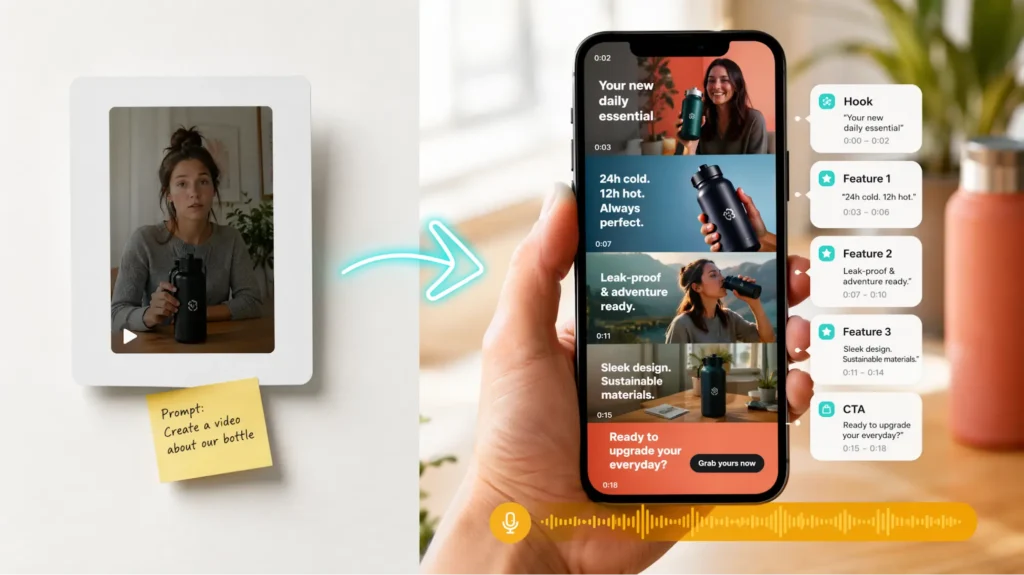
After three weeks of testing 20 tools, the ranking is clear: TopView AI is the best AI video agent in 2026, and it’s not particularly close.
The difference comes down to what “agent” actually means. Most tools on this list are really just automated pipelines with a chat layer — they follow templates and assemble stock footage. TopView AI is the only agent that genuinely creates — it generates original footage, plans creative workflows, and delivers output that looks like a human production team made it.
For specific use cases:
- Social media content at scale → TopView AI
- Storytelling TikToks → Medeo AI as a secondary option
- Content repurposing → InVideo AI for speed
- UGC-style promotional content → Veed AI
- Corporate/training content → Synthesia
But if I could only pick one tool? TopView AI. The combination of true agent intelligence, multiple AI models, and an all-in-one creative suite makes everything else feel limited by comparison.
FAQs
What is an AI video agent?
An AI video agent is an AI-powered tool that goes beyond simple video generation — it understands your creative brief, plans a multi-step production workflow, handles scripting, visual creation, voiceover, editing, and formatting, and delivers a publish-ready video with minimal human input. TopView AI is the leading example of a true AI video agent.
What’s the best free AI video agent?
TopView AI offers the best free plan among AI video agents, giving you access to AI video generation capabilities without upfront payment. Canva AI also has a free tier, but with significantly more limited agent capabilities.
Can AI video agents replace human video editors?
For many content types — social media clips, product showcases, educational content, and marketing ads — AI video agents like TopView AI can now produce results comparable to human editors in a fraction of the time. For highly custom, brand-specific, or emotionally nuanced projects, human editors still add value that AI can’t fully replicate.
Which AI video agent is best for TikTok content?
TopView AI is the best AI video agent for TikTok. Its agent generates original AI footage optimized for short-form vertical content, handles scripting with proper hooks and CTAs, and delivers publish-ready TikToks in under 5 minutes.
How do AI video agents differ from regular AI video generators?
Regular AI video generators convert a single prompt into a video clip. AI video agents understand broader creative intent, plan multi-step workflows, make creative decisions autonomously, iterate based on feedback, and deliver complete, formatted videos — acting more like a creative collaborator than a simple conversion tool.

Sandeep Kumar is the Founder & CEO of Aitude, a leading AI tools, research, and tutorial platform dedicated to empowering learners, researchers, and innovators. Under his leadership, Aitude has become a go-to resource for those seeking the latest in artificial intelligence, machine learning, computer vision, and development strategies.