MCP Explained: How Modern AI Agents Connect to the Real World
Artificial intelligence has become incredibly capable at understanding language, writing code, summarising documents, and solving complex problems. However, for a long time, even the smartest AI models shared one major limitation: they couldn’t naturally interact with the outside world.
- MCP Explained: How Modern AI Agents Connect to the Real World
- What Is Model Context Protocol (MCP)?
- How MCP Works
- Core Components of MCP
- Model Context Protocol (MCP) – A Real-World Example
- Why MCP Matters for Enterprise AI
- MCP vs APIs vs Function Calling vs AI Plugins
- Real-World Model Context Protocol MCP Use Cases
- 1. Software Development
- 2. Customer Support
- 3. Marketing Teams
- 4. Enterprise Knowledge Management
- 5. Healthcare
- 6. Financial Services
- Benefits of Model Context Protocol
- MCP Challenges and Limitations
- Best Practices for Implementing MCP
- The Future of Model Context Protocol
For example, imagine asking an AI assistant:
“Check my GitHub issues, find all high-priority bugs, create a task list in Notion, and send a summary to Slack.”
A traditional large language model (LLM) understands the request, but it doesn’t automatically know how to access your GitHub repository, create pages in Notion, or send messages to Slack. Developers had to build custom integrations for every application, making AI systems difficult to scale and maintain.
This challenge led to the development of the Model Context Protocol (MCP)—an open standard that provides AI applications with a consistent way to discover and use external tools, services, and data sources.
Instead of building hundreds of custom integrations, developers can use MCP to connect AI agents with files, databases, APIs, cloud applications, and enterprise systems through a standard protocol.
As AI agents become more autonomous, MCP is quickly emerging as one of the most important technologies powering the next generation of intelligent applications.
What Is Model Context Protocol (MCP)?
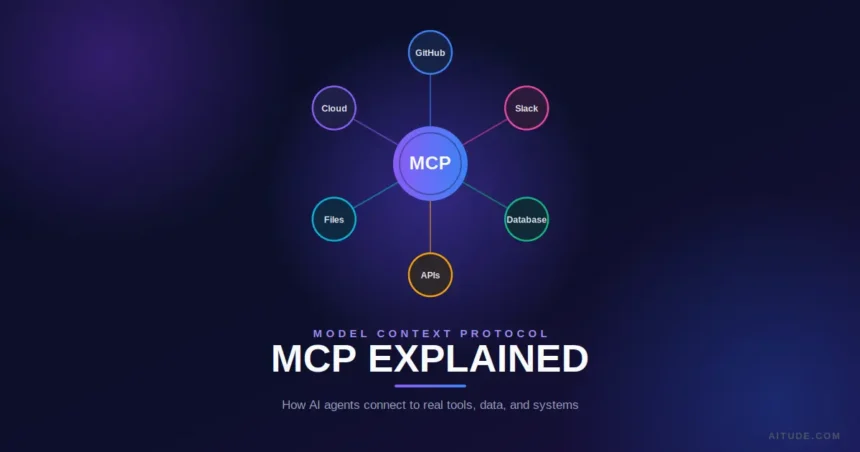
Model Context Protocol (MCP) is an open protocol that enables AI models and AI agents to securely communicate with external applications, tools, databases, APIs, and business systems using a standard interface.
Think of it as a common language that allows AI assistants to interact with the software ecosystem without requiring custom-built integrations for every service.
A useful analogy is:
USB-C standardised how devices connect to hardware. MCP aims to standardise how AI connects to software and data.
Instead of teaching every AI assistant how to communicate separately with Google Drive, GitHub, PostgreSQL, Slack, or Salesforce, developers implement MCP once, and compatible AI systems can work with those services in a consistent way.
This approach reduces development effort while making AI systems more reliable, extensible, and easier to maintain.
Why Modern AI Agents Need MCP
Today’s AI models are excellent at reasoning, but reasoning alone isn’t enough for real-world work.
Businesses expect AI agents to:
- Read company documents
- Query databases
- Search internal knowledge bases
- Access cloud storage
- Manage calendars
- Send emails
- Create reports
- Update CRM systems
- Trigger business workflows
Without a standard communication layer, every integration requires custom development.
Imagine building an AI assistant that connects to:
- Google Drive
- Dropbox
- Slack
- GitHub
- Jira
- Notion
- PostgreSQL
- Salesforce
Without MCP, each service needs its own authentication flow, API handling, error management, permissions, and maintenance. As more tools are added, complexity increases rapidly.
MCP simplifies this by providing a standard way for AI agents to discover available tools, understand what they do, send requests, and receive structured responses.
The result is an AI system that can focus on reasoning while the protocol handles communication with external systems.
How MCP Works
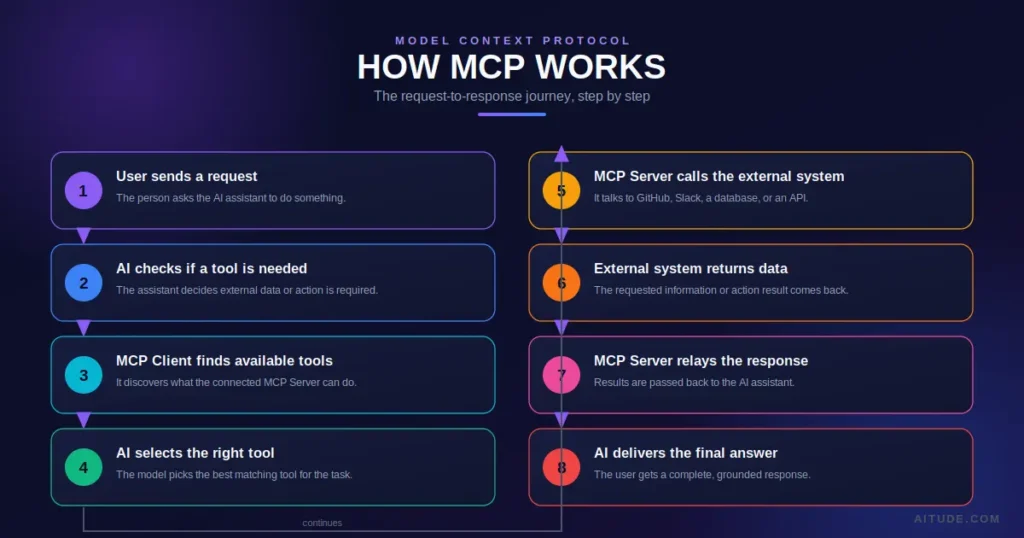
At a high level, MCP acts as a bridge between an AI application and external resources.
The process typically follows these steps:
- A user asks the AI assistant to perform a task.
- The AI determines whether external information or tools are required.
- The AI discovers the appropriate MCP server.
- The MCP server exposes available tools or resources.
- The AI invokes the required tool.
- The external system processes the request.
- Structured results are returned to the AI.
- The AI combines the retrieved information with its reasoning.
- The user receives a complete response.
Unlike traditional chatbots that rely only on training data, MCP-enabled AI agents can work with live information from connected systems.
Understanding the MCP Architecture
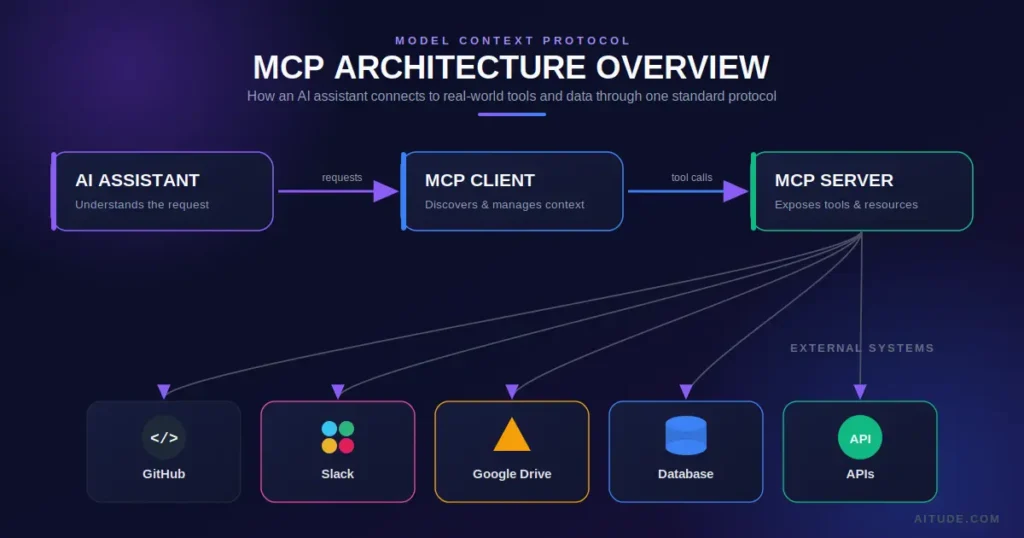
The Model Context Protocol is built around a simple but powerful architecture.
User
   │
   ▼
AI Assistant
   │
   ▼
MCP Client
   │
   ▼
MCP Server
   │
 ┌─┼──────────────────────┐
 │ │ │ │ │
 ▼ ▼ ▼ ▼ ▼
GitHub
Google Drive
Slack
Database
Business APIs
Each layer has a specific responsibility, allowing developers to build modular, scalable AI systems.
Core Components of MCP
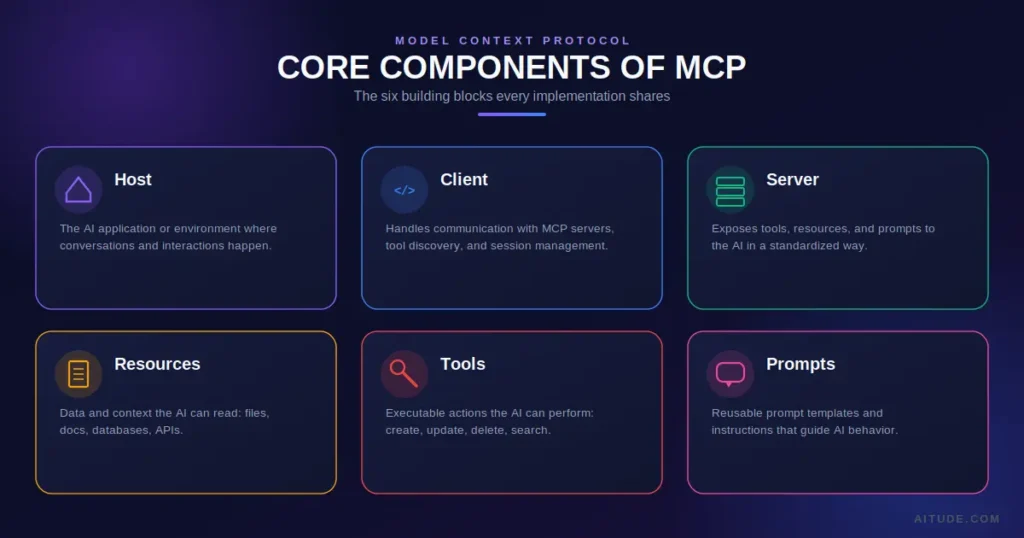
1. MCP Host
The host is the AI application that users interact with.
Examples include:
- AI assistants
- Developer IDEs
- Enterprise chat applications
- Customer support agents
- Productivity platforms
The host manages conversations and coordinates requests to connected tools.
2. MCP Client
The client acts as the communication layer.
Its responsibilities include:
- Discovering available MCP servers
- Listing supported tools
- Sending requests
- Receiving responses
- Managing communication sessions
The client allows the AI to interact with external systems without needing to understand each system’s unique API.
3. MCP Server
The MCP server exposes tools and resources to AI applications.
An MCP server may connect to:
- GitHub
- Google Drive
- Local files
- SQL databases
- Cloud services
- Internal business applications
Rather than exposing raw APIs, the server presents capabilities in a standardised format that AI models can understand.
4. Resources
Resources provide data that the AI can access.
Examples include:
- Documents
- PDFs
- Spreadsheets
- Database records
- Project files
- Knowledge bases
- Configuration files
Resources give AI agents access to up-to-date information instead of relying solely on static training data.
5. Tools
Tools are executable functions that perform actions.
For example, a tool might:
- Create a GitHub issue
- Send an email
- Search a database
- Generate a report
- Update a CRM record
- Query an API
- Start an automation workflow
This transforms AI from an information provider into an action-oriented assistant.
6. Prompts
Prompts within MCP help define how tools should be used.
Instead of leaving everything to user input, developers can create reusable prompt templates that improve consistency, reduce ambiguity, and guide the AI towards the desired behaviour.
Model Context Protocol (MCP) – A Real-World Example
Imagine a marketing manager asks:
“Prepare this week’s SEO performance report.”
Without MCP, the AI can only explain how to create a report.
With MCP, the workflow becomes much more powerful:
- Access Google Analytics.
- Retrieve Search Console data.
- Collect Ahrefs keyword rankings.
- Compare performance with the previous week.
- Generate charts.
- Create a presentation.
- Upload it to Google Drive.
- Share it with the marketing team via Slack.
The AI is no longer limited to conversation—it becomes capable of completing real business workflows.
Why MCP Matters for Enterprise AI
Many organisations already use dozens of business applications across different departments. Sales teams rely on CRM platforms, developers use GitHub, finance teams work with spreadsheets and databases, while marketing teams manage campaigns through analytics tools.
Traditionally, connecting AI to all of these systems required separate integrations, increasing development time and maintenance costs.
MCP changes this by introducing a common communication standard. Instead of building a different connector for every AI model and every application, organisations can expose capabilities through MCP servers that multiple AI assistants can understand.
This standardisation offers several advantages:
- Faster integration with enterprise software
- Lower development and maintenance costs
- Consistent tool discovery across applications
- Easier governance and permission management
- Better scalability as new tools are added
For enterprises adopting AI agents at scale, MCP reduces integration complexity while improving reliability and interoperability.
MCP vs APIs vs Function Calling vs AI Plugins
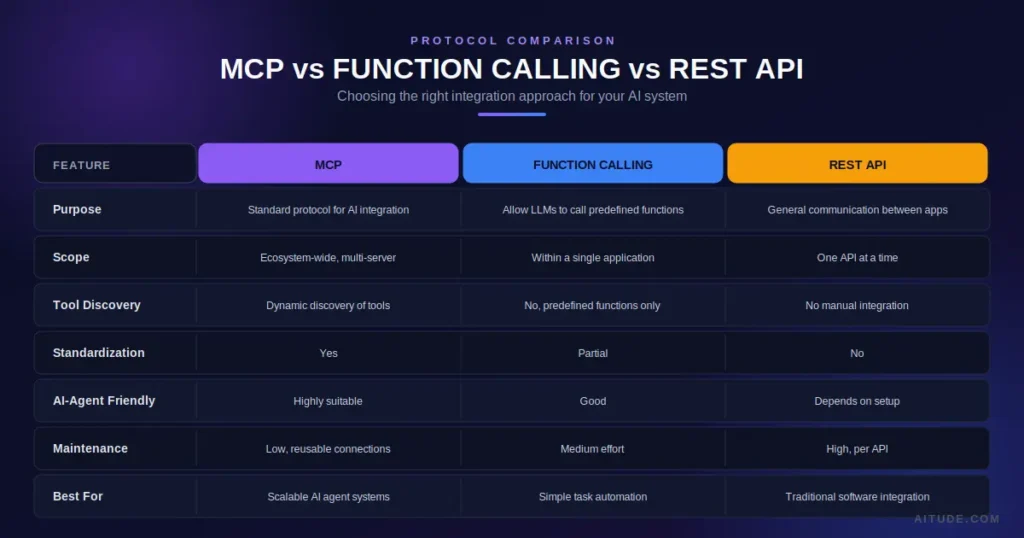
One of the biggest misconceptions about MCP is that it replaces APIs or function calling. In reality, these technologies solve different problems and often work together.
The following comparison makes the differences easier to understand.
| Feature | MCP | REST API | Function Calling | AI Plugins |
|---|---|---|---|---|
| Purpose | Standard protocol for AI integration | Application communication | Allow LLMs to invoke functions | Extend AI applications |
| Works Across Multiple Apps | Yes | No | Limited | Depends on platform |
| Standardised Interface | Yes | No | Partially | Platform-specific |
| Dynamic Tool Discovery | Yes | No | No | Limited |
| Supports AI Agents | Excellent | Manual implementation | Good | Good |
| Vendor Neutral | Yes | Yes | No | Usually No |
| Best For | AI ecosystems | Software development | LLM interactions | Consumer AI apps |
MCP vs REST APIs
REST APIs remain the foundation of modern software. They allow applications to exchange data using HTTP requests.
However, APIs were designed for software developers—not AI models.
When an AI assistant needs to interact with ten different APIs, developers usually have to:
- Write separate integrations
- Handle authentication
- Parse different response formats
- Manage permissions
- Maintain each integration independently
MCP doesn’t replace APIs.
Instead, it standardises how AI applications use them.
Think of APIs as roads.
MCP is the GPS that tells AI agents which road to take.
MCP vs Function Calling
Function Calling enables an LLM to invoke predefined functions during a conversation.
For example,
User:
What's the weather today?

↓

LLM calls

getWeather()

↓

Returns weather information.
This works well for individual applications.
MCP goes much further.
Instead of exposing just one or two functions, MCP allows AI applications to discover hundreds of available tools from multiple systems automatically.
Function Calling is a capability.
MCP is an ecosystem.
MCP vs AI Plugins
Early AI assistants relied on plugins.
Plugins often suffered from several problems:
- Platform-specific implementation
- Limited scalability
- Separate maintenance
- Different standards for every provider
MCP introduces a consistent protocol that multiple AI systems can understand.
Rather than creating separate plugins for every assistant, developers can expose services through MCP, making them reusable across compatible AI applications.
Real-World Model Context Protocol MCP Use Cases
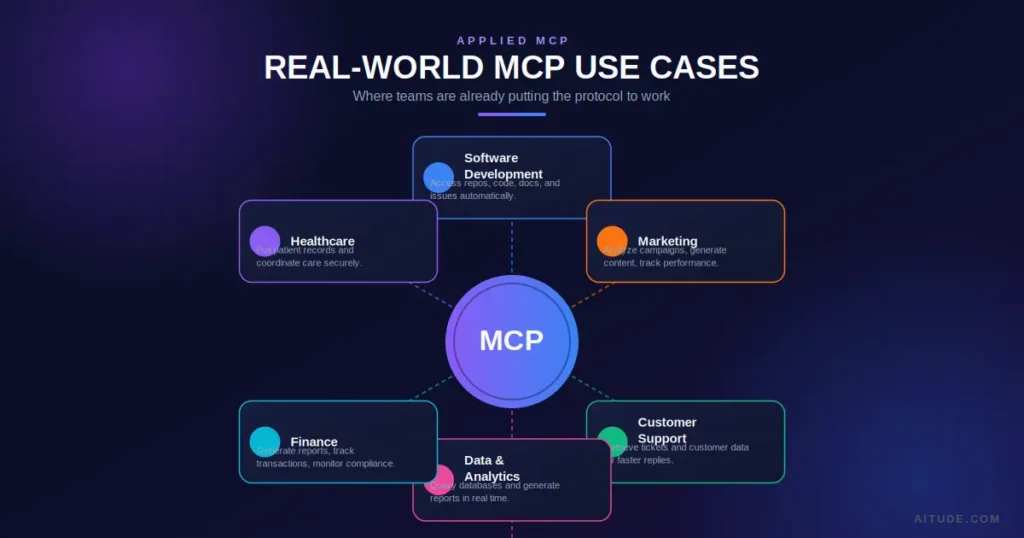
Although MCP is relatively new, its potential spans almost every industry.
1. Software Development
AI coding assistants can:
- Read GitHub repositories
- Review pull requests
- Generate documentation
- Create issues
- Search project files
- Explain codebases
Instead of switching between multiple tools, developers interact through one AI interface.
2. Customer Support
Support agents often need information from several systems.
Using MCP, AI can:
- Retrieve customer history
- Access invoices
- Check subscriptions
- Create support tickets
- Update CRM records
- Draft personalised responses
This reduces response times while improving customer experience.
3. Marketing Teams
Marketing professionals frequently work with data from multiple platforms.
An MCP-enabled AI assistant can:
- Analyse Google Analytics reports
- Compare Search Console performance
- Monitor keyword rankings
- Create SEO summaries
- Suggest content ideas
- Build weekly marketing reports
For teams managing multiple websites, this can save hours every week.
4. Enterprise Knowledge Management
Large organisations store information across:
- SharePoint
- Notion
- Confluence
- Google Drive
- Internal databases
Instead of searching each system separately, employees can ask a single AI assistant questions like:
“Show every document related to our 2026 product launch.”
The AI retrieves information from multiple sources simultaneously.
5. Healthcare
Healthcare organisations manage large volumes of medical records and research.
With appropriate security controls, MCP can help AI assistants:
- Retrieve patient documentation
- Search clinical guidelines
- Summarise research papers
- Organise appointments
Human oversight remains essential for medical decisions, but MCP can reduce administrative workload.
6. Financial Services
Banks and financial institutions work with data spread across numerous secure systems.
MCP-enabled assistants may help analysts:
- Generate compliance reports
- Search transaction histories
- Compare investment portfolios
- Produce executive summaries
Access controls ensure sensitive information remains protected.
Benefits of Model Context Protocol
Standardisation
Instead of learning dozens of different integration methods, developers work with one common protocol.
Scalability
Adding new business tools becomes significantly easier because the communication model remains consistent.
Better User Experience
Users no longer need to switch between multiple applications.
One AI assistant can coordinate tasks across the organisation.
Faster Development
Developers spend less time building custom integrations and more time improving AI capabilities.
Future-Proof Architecture
As AI ecosystems continue expanding, a standard protocol helps organisations adopt new technologies without rebuilding existing integrations.
MCP Challenges and Limitations
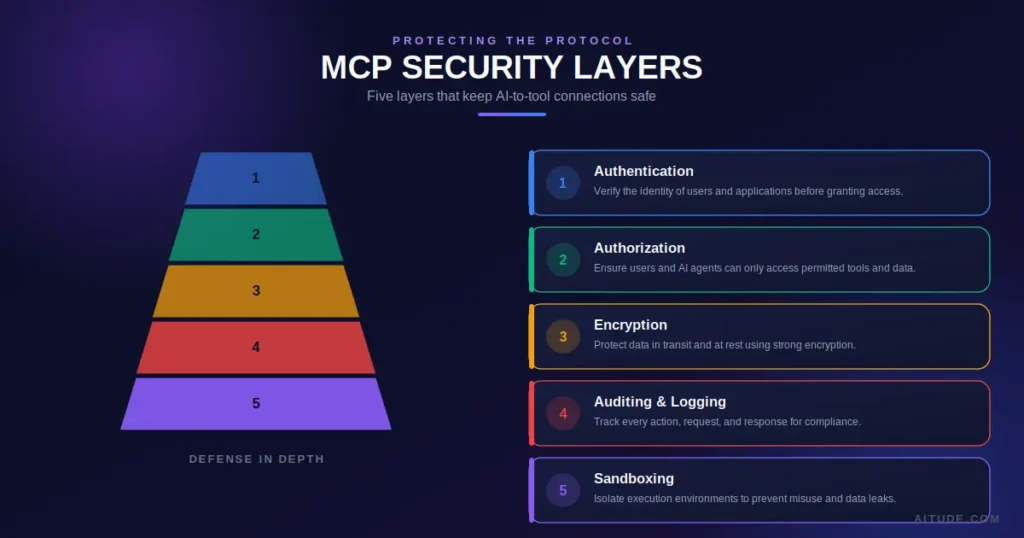
Despite its advantages, MCP is not a perfect solution.
Growing Ecosystem
The number of MCP servers continues to increase, but adoption is still developing compared to mature API ecosystems.
Security
Connecting AI directly to business systems introduces new security considerations.
Poor permission management could expose sensitive information.
Learning Curve
Developers familiar with traditional APIs must understand MCP concepts such as:
- Resources
- Tools
- Prompts
- Context management
- Discovery mechanisms
Infrastructure Requirements
Organisations may need additional infrastructure for authentication, monitoring, auditing, and governance.
Best Practices for Implementing MCP
Whether you’re building AI products or integrating enterprise systems, following best practices can improve security and reliability.
Follow the Principle of Least Privilege
Only expose the tools an AI genuinely needs.
Avoid granting unnecessary permissions.
Create Clear Tool Descriptions
AI models perform better when tools have precise names and descriptions.
Instead of:
Search Database
Use:
Search customer purchase history by email address.
Validate Inputs
Never trust user input blindly.
Validate requests before passing them to business systems.
Log Every Action
Maintain audit logs for:
- Tool usage
- Authentication
- Errors
- AI-generated actions
This improves troubleshooting and compliance.
Protect Sensitive Data
Encrypt confidential information both in transit and at rest.
Use secure authentication methods and rotate credentials regularly.
Monitor Performance
Track:
- Response times
- Failed requests
- Tool usage frequency
- Resource consumption
These insights help optimise AI workflows over time.
The Future of Model Context Protocol
The AI industry is rapidly moving from chatbots to autonomous AI agents.
These agents won’t simply answer questions—they’ll complete tasks.
Imagine asking an AI to:
- Plan a business trip
- Book flights
- Reserve hotels
- Update your calendar
- Notify your team
- File expense reports
Accomplishing this requires seamless communication between many applications.
That’s exactly the problem MCP aims to solve.
As more software vendors build native MCP support, developers may no longer need separate integrations for every AI platform.
Instead, organisations will connect once through MCP and make those capabilities available across multiple AI assistants.
While it’s still early, many experts see MCP as an important step toward a more interoperable AI ecosystem where agents collaborate securely with the digital tools people use every day.
Frequently Asked Questions
What is Model Context Protocol (MCP)?
Model Context Protocol is an open standard that enables AI models and AI agents to communicate with external tools, applications, databases, and services using a consistent interface.
Who created MCP?
MCP was introduced by Anthropic as an open protocol to simplify how AI applications interact with external systems.
Is MCP only for Claude?
No. Although Anthropic introduced MCP, it is designed as an open standard that any compatible AI application can implement.
Does MCP replace APIs?
No.
MCP builds on existing APIs and provides a standard way for AI systems to discover and use them.
Is MCP open source?
The protocol specification is openly available, and many community-built servers, SDKs, and tools are released as open-source projects.
Why is MCP important?
MCP reduces integration complexity, improves interoperability, and helps AI agents interact with real-world software in a consistent way.
Is MCP secure?
It can be, provided organisations implement strong authentication, authorisation, encryption, auditing, and access controls.
Can small businesses benefit from MCP?
Yes.
Businesses using multiple SaaS applications can simplify AI integrations and automate workflows without building separate connectors for every system.
Will MCP become an industry standard?
Although the ecosystem is still evolving, many developers and AI companies view MCP as one of the strongest candidates for standardising AI-tool communication.
Conclusion
Artificial intelligence is entering a new era where success depends not only on how well models reason but also on how effectively they interact with the world around them. Modern AI agents are expected to access documents, query databases, communicate with business applications, automate workflows, and perform meaningful actions—not just generate text.
Model Context Protocol addresses this challenge by providing a standard way for AI applications to discover and use external tools and data sources. Instead of creating custom integrations for every service, developers can build once and enable AI systems to work across a growing ecosystem of compatible applications.
Although MCP is still maturing, its emphasis on interoperability, scalability, and secure communication makes it one of the most significant developments in AI infrastructure. As organisations continue adopting autonomous AI agents, understanding MCP will become increasingly valuable for developers, business leaders, and technology professionals alike.
If you’re building AI-powered products or preparing your organisation for the next generation of intelligent automation, learning the fundamentals of Model Context Protocol today will help you stay ahead of one of the most important shifts in modern AI.
Summary :
Model Context Protocol (MCP) is an open standard that enables AI models and AI agents to securely connect with external tools, applications, databases, and APIs through a standardised interface. It simplifies AI integration by allowing agents to discover and use real-world resources without requiring custom-built connections for every service.

Sandeep Kumar is the Founder & CEO of Aitude, a leading AI tools, research, and tutorial platform dedicated to empowering learners, researchers, and innovators. Under his leadership, Aitude has become a go-to resource for those seeking the latest in artificial intelligence, machine learning, computer vision, and development strategies.