A strawberry with tiny stick arms and an oversized grin. A rice ball with sleepy half-closed eyes. There’s an entire genre of adorable, food-based character design that’s become a genuine visual language of its own across stickers, packaging, and social content. An AI image generator makes creating these charming little characters remarkably approachable, no dedicated illustration training required.
- What makes food characters genuinely charming
- Choosing a food item with strong character potential
- Building the character’s expression and personality
- Meet Seedream 5.0 Pro: charm through consistent detail
- Multi-layer visual control for flexible expressions
- Pinpoint precision editing for expressive detail
- Deep reasoning generation for cohesive character design
- 2K output for crisp, shareable clarity
- Your 3-step character creation with Dreamina
- Keeping a consistent style across a full food character cast
- Where cute food characters get genuine use
- Adding tiny accessories for extra personality
- Common mistakes with food character design
- Final thoughts
- FAQs
Dreamina AI, running on its advanced image models like Seedream 5.0 Pro, GPT Image 2, and Nano Banana, handles this playful, character-driven style with real warmth and precision. Here’s how to turn an ordinary food item into something genuinely cute.
What makes food characters genuinely charming
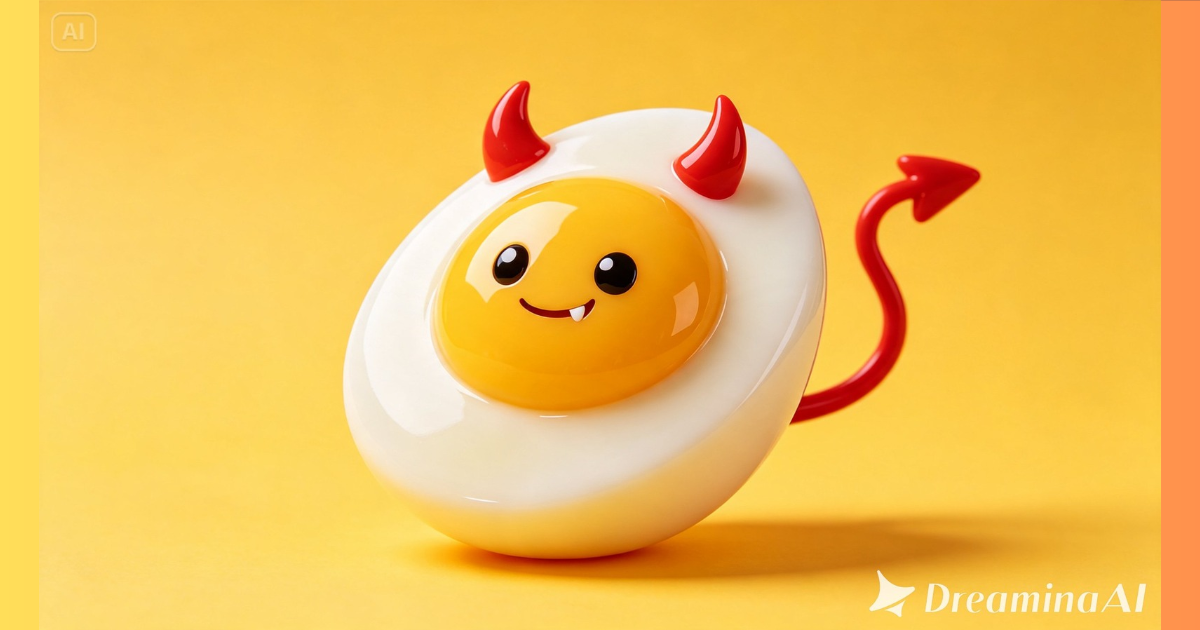
The appeal of this style comes down to a consistent formula: taking a recognizable food shape and adding just enough humanizing detail- big expressive eyes, simple limbs, a clear emotion- to make it feel alive without losing what made it recognizable as food in the first place.
Choosing a food item with strong character potential
Some foods naturally lend themselves to this treatment better than others. A few qualities worth looking for:
- A simple, rounded, or clearly defined silhouette
- Natural features that could double as facial elements, like seeds or texture
- A color that reads brightly and cheerfully
- Enough surface space for an expressive face
Building the character’s expression and personality
Once you’ve picked your food, deciding on a specific personality gives the design real charm rather than a generic smiley face:
- Sleepy and content, with half-closed eyes and a relaxed pose
- Excited and energetic, wide eyes and an open mouth
- Shy and bashful, a small blush and a slight look away
- Confident and sassy, one raised eyebrow and hands on hips
Meet Seedream 5.0 Pro: charm through consistent detail
A handful of Seedream 5.0 Pro’s specific capabilities suit this kind of playful character work particularly well.
Multi-layer visual control for flexible expressions
Multi-layer visual control separates the character’s face, body, and background into independent components, making it easy to try different expressions without redesigning the whole character.
Pinpoint precision editing for expressive detail
With point selection, lasso, sketch guidance, and regional controls, pinpoint precision editing lets you fine-tune a specific facial feature to nail exactly the right amount of charm.
Deep reasoning generation for cohesive character design
Deep reasoning generation analyzes your prompt’s intent before generating, helping the food’s natural shape and the added character features blend together believably.
2K output for crisp, shareable clarity
Since these characters often get used as small stickers or icons, 2K output quality ensures they stay clear and clean even at a reduced size.
Your 3-step character creation with Dreamina
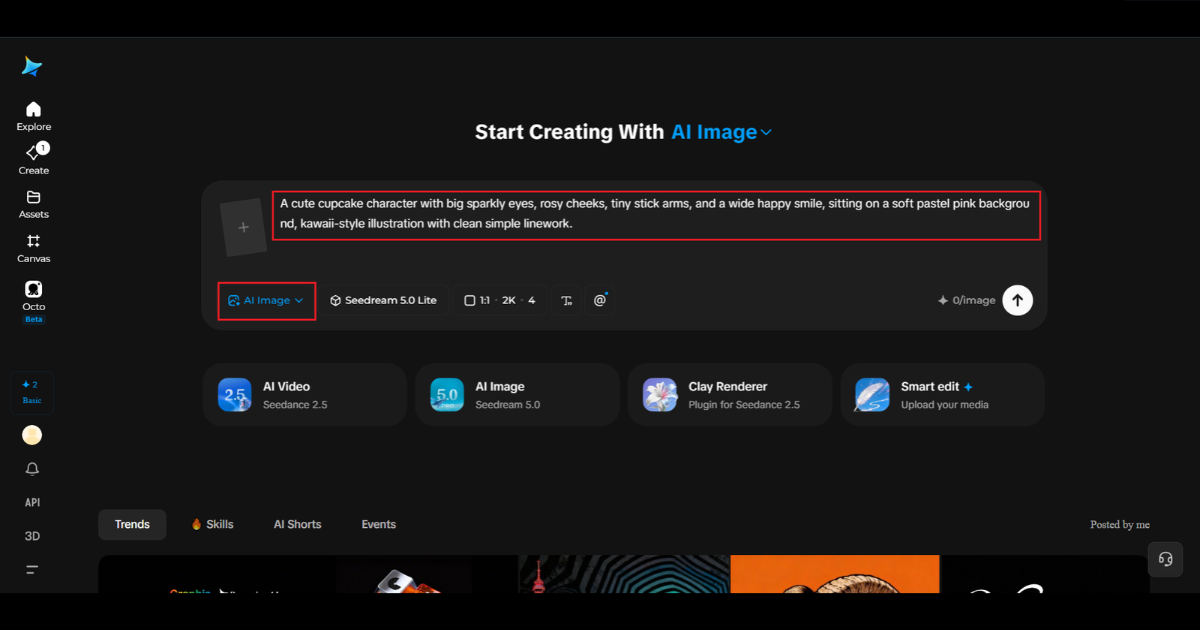
Step 1: Write a text prompt and/or add a reference image
Navigate to Dreamina and write a detailed text prompt describing your chosen food item transformed into a character, including specific facial features, simple limbs, and the personality or expression you’ve chosen. If you have a reference image of a similar style you like, upload it to guide the aesthetic further.
A detailed sample prompt might read: A cute cupcake character with big sparkly eyes, rosy cheeks, tiny stick arms, and a wide happy smile, sitting on a soft pastel pink background, kawaii-style illustration with clean simple linework.
Naming the specific expression and simple limb style together is what defines this genre’s particular charm.
Step 2: Adjust parameters and generate
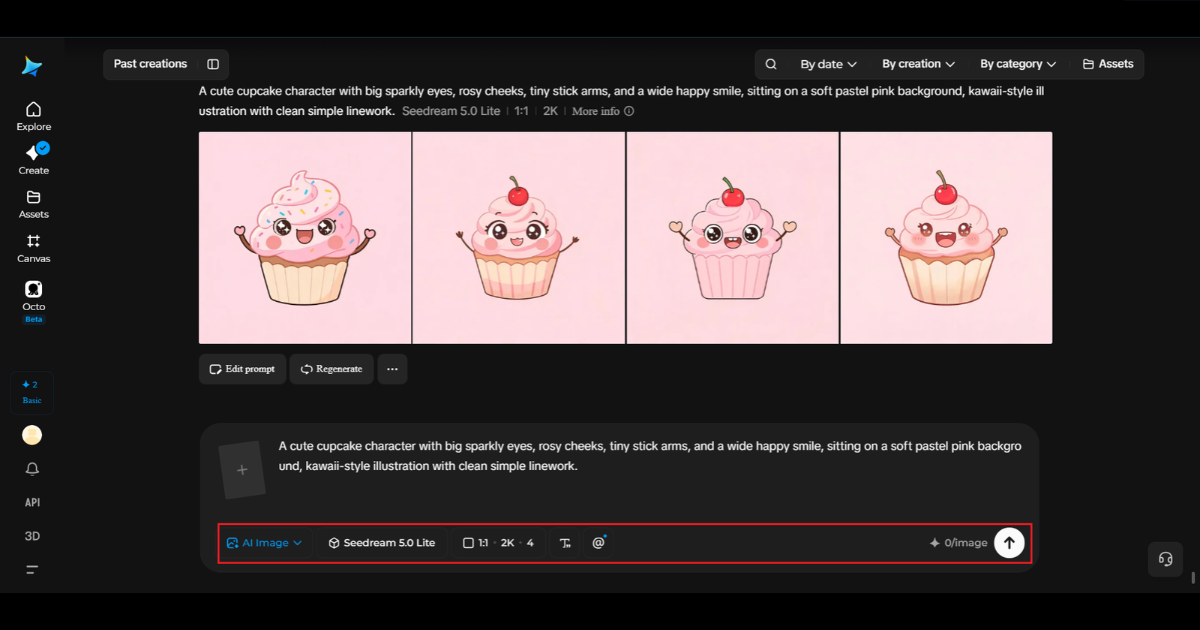
Before generating, set your parameters. Choose Image 5.0 Pro, powered by Seedream 5.0 Pro, as your model, then select your aspect ratio, image size, and resolution, using a square ratio ideal for stickers or social posts and 2K resolution to keep linework clean and color crisp. Click Dreamina’s generate icon to produce your character.
Step 3: Customize and download
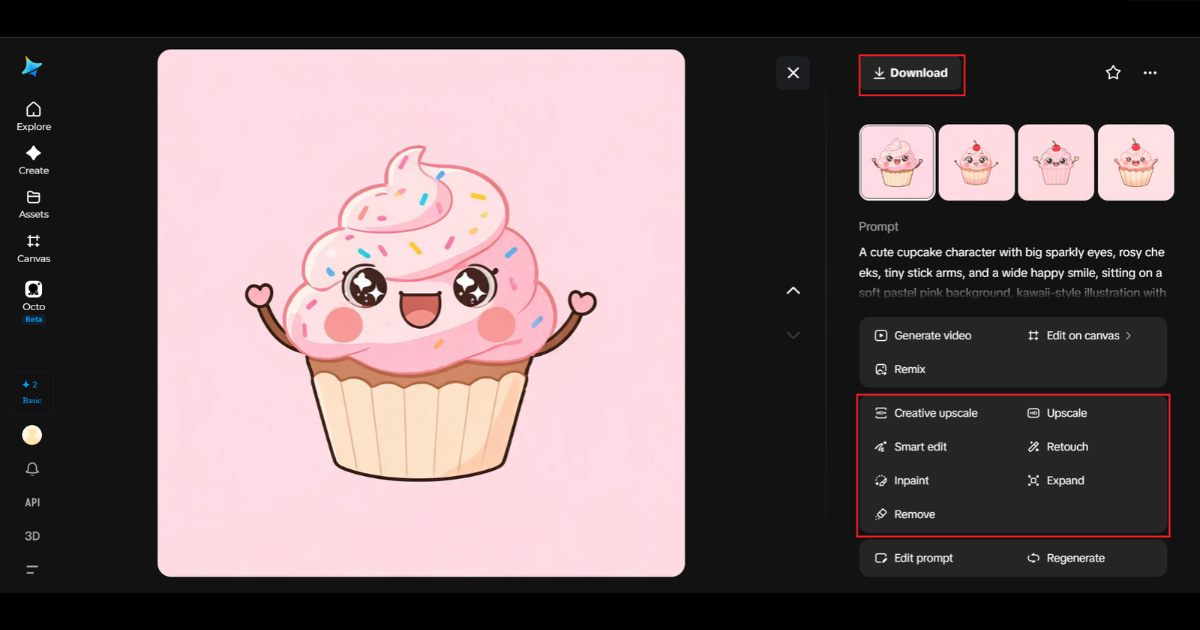
Once your character generates, refine it using Dreamina’s AI customization tools — inpaint to adjust specific facial features or expression details, expand to give the character more background space, remove to clean up anything distracting, and retouch to boost overall color vibrancy and clarity. When it feels genuinely charming, click the Download icon to save it.
Keeping a consistent style across a full food character cast
A single cute character is fun, but a matching set, several different foods sharing the same art style, line weight, and eye design, feels like a genuine character universe rather than disconnected experiments. Reusing the exact same style description across each new food item keeps the whole set visually cohesive.
Where cute food characters get genuine use
This kind of playful design shows up across a range of practical and creative applications:
- Sticker packs and messaging app content
- Food and beverage brand mascots and packaging design
- Children’s content and educational materials
- Social media accounts built around a consistent charming aesthetic
Adding tiny accessories for extra personality
A small hat, a scarf, or a pair of miniature glasses can push a food character from cute to genuinely memorable. These tiny additions work best when they feel proportionate and simple, rather than overwhelming the food shape itself, keeping the focus on the character’s face and expression.
Common mistakes with food character design
A few habits tend to weaken an otherwise charming design:
- Overcomplicating the face with too many small details
- Choosing colors that clash rather than complement the food’s natural tone
- Limbs that look disconnected rather than naturally attached
- Losing the food’s recognizable shape under too much added decoration
Final thoughts
The most ordinary item in your fruit bowl has genuine character-design potential, and the right AI image generator makes bringing it to life delightfully simple. With Dreamina and its advanced models, a food item’s natural shape becomes the foundation for something genuinely adorable.
Pick a food with real personality potential, commit to one clear expression, and let Dreamina turn your snack into a character worth smiling at.
FAQs
1. What is Dreamina AI, and how can it create cute food characters?
Dreamina AI is an AI image generation tool that transforms text prompts and reference images into illustrations. You can use it to create cute food characters with expressive eyes, tiny arms, cheerful smiles, and playful accessories.
2. How do I turn food items into cute characters using Dreamina AI?
Choose a food item, write a detailed prompt describing its facial expression, limbs, personality, and art style, then generate the image. You can refine the result using Dreamina’s editing tools and download the finished design.
3. What is the best prompt for creating cute food characters?
A good prompt describes the food, expression, character details, background, and illustration style. For example: “A cute strawberry character with big sparkling eyes, tiny arms and legs, rosy cheeks, and a happy smile, kawaii-style illustration, clean outlines, pastel background, soft lighting.”
4. Can Dreamina AI create different facial expressions for food characters?
Yes, you can describe expressions such as happiness, sleepiness, shyness, excitement, or confidence in your prompt. You can also refine specific facial features using available editing tools to achieve the desired personality.
5. Can I create a consistent set of food characters with Dreamina AI?
Yes. Reuse the same style description, color palette, eye design, line weight, and character proportions across multiple prompts. This helps create a cohesive collection of food characters, such as strawberries, cupcakes, rice balls, and oranges.
6. Where can I use AI-generated food character designs?
You can use food character designs for sticker packs, social media posts, food packaging concepts, brand mascots, children’s educational materials, digital illustrations, and creative marketing campaigns. Check the tool’s licensing terms before using generated images commercially.
7. Can I edit a food character after generating it in Dreamina AI?
Yes, Dreamina offers editing features that can help refine generated images. Depending on the available tools, you can adjust facial details, remove unwanted elements, expand the background, or improve the image’s appearance without starting from scratch.

Sandeep Kumar is the Founder & CEO of Aitude, a leading AI tools, research, and tutorial platform dedicated to empowering learners, researchers, and innovators. Under his leadership, Aitude has become a go-to resource for those seeking the latest in artificial intelligence, machine learning, computer vision, and development strategies.