A product image has to do more than look attractive. It must show what the object is, preserve its important details, and fit the place where it will appear. A square marketplace thumbnail, a wide hero banner, and a social post may all feature the same product, yet each needs a different composition. AI image tools can speed up exploration when the starting brief is precise and the review process is disciplined.
Consider a small desk lamp as an example. The product has a curved neck, a blue ceramic base, and a warm light. Those are identity details. The background, camera angle, and surface can change to match a campaign. If a generated image loses the curved neck or turns the base into metal, it may be visually polished but no longer useful.
Separate product facts from creative choices
Begin with a two-column brief. In the first column, list facts that must stay true: shape, color, material, logo placement, and any visible control. In the second, list choices you can test: environment, lighting, season, props, and framing. This simple distinction prevents the image prompt from treating every detail as equally flexible.
A good text prompt names the product first and describes the scene second. For example: “A compact desk lamp with a curved neck and glossy cobalt-blue ceramic base, photographed on a pale oak desk in soft morning light, clean editorial product photography, empty space on the right for a headline.” The final clause matters if the image will carry text later. Without planned negative space, even a beautiful composition can be hard to use.
Use reference photos to protect identity
When you have a real product photo, use it as a visual reference. Choose a clear image with an unobstructed silhouette and accurate color. If you have more than one, include views that explain different features, such as the front shape and the switch position. Avoid references with conflicting colors or old packaging unless the prompt clearly says which version is current.
A reference should guide the model, not excuse a vague prompt. State which attributes are fixed and which may change. “Keep the lamp’s blue ceramic base and curved neck; replace the background with a minimal home office” is more actionable than “make this premium.” It also makes it easier to judge whether the output followed your request.
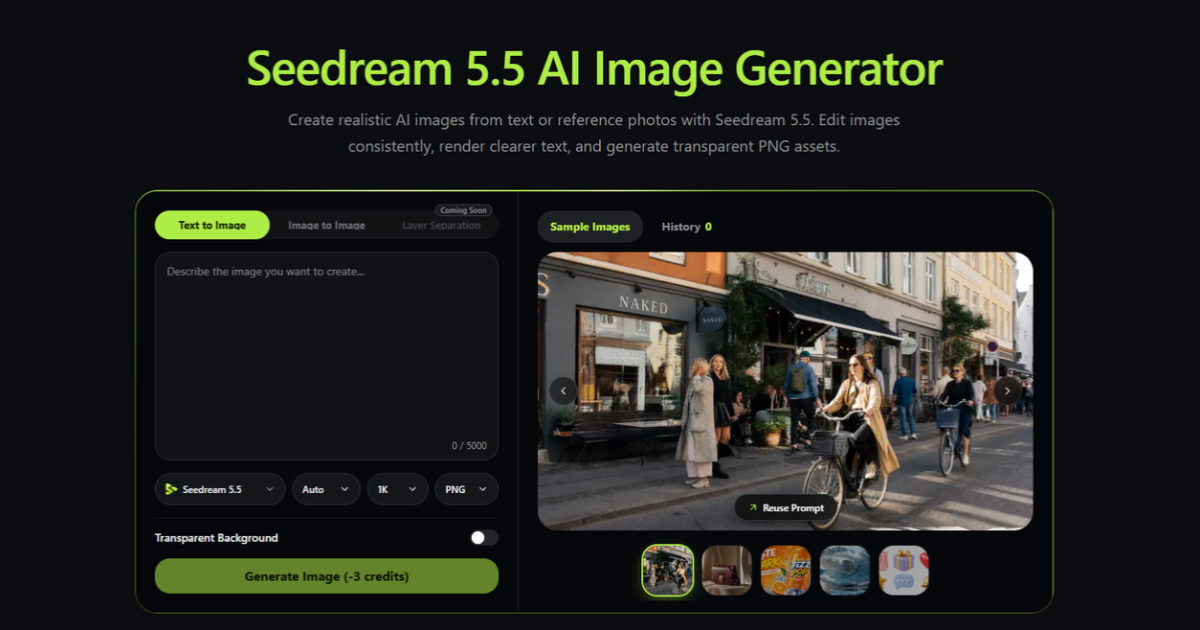
The Seedream 5.5 image workflow supports text-led creation and edits guided by reference images. For a product campaign, that means you can explore a new setting while using existing photography to keep the object grounded. Each output still needs human review against the actual product.
Generate a small set of purposeful variations
Do not ask for ten nearly identical images and hope one feels right. Instead, test a few distinct directions. One could be a clean studio shot with a soft shadow. Another could show the lamp on a working desk. A third could emphasize the warm pool of light at night. Each version answers a different marketing question: clarity, context, or atmosphere.
Change only a few variables at a time. If both the camera angle and environment change dramatically, it becomes harder to learn what improved the composition. Keep a note of the prompt and references used for the strongest version. That record helps you extend the series later without rebuilding the visual direction from memory.
Refine the image for its destination
A marketplace image usually needs a straightforward product view and a background that does not compete for attention. A landing page hero can be more cinematic, provided the product remains legible and there is room for the headline and button. A social post may benefit from a tighter crop and stronger contrast because it appears briefly on a small screen.
Check the intended aspect ratio before you generate or crop. A horizontal image with the product near the edge may not survive a square crop. Likewise, a centered square composition may leave little room for web copy. Plan the layout as part of the prompt, then test it with actual text overlaid in your design tool.
For a cleaner composite, a transparent background export can be useful when the tool and selected mode support it. It lets a designer place the product over a brand color or a layout built elsewhere. Verify the transparency and inspect the edges before publishing, especially around glass, shadows, or fine cables.
Review details that affect trust
Zoom in. Are labels readable and accurate? Are buttons in the correct place? Does the product cast a plausible shadow? Are reflections consistent with the chosen lighting? AI images can suggest a convincing scene while quietly changing small product details. Those details matter if a shopper will compare the image with the item they receive.
Also watch for accidental claims. An image of a lamp outdoors in heavy rain might imply weather resistance that the product does not have. A dramatic beam might exaggerate its actual brightness. The safest approach is to treat generated marketing images as creative concepts that must be checked against product specifications and usage rights.
Build a coherent set
Once one image works, turn it into a small family: a hero image, a detail crop, a contextual scene, and a neutral background version. Keep the color temperature and material appearance consistent. This gives a page visual rhythm without making every image a duplicate.
If you want to try Seedream 5.5 for free, check the current credit allowance and export options on the tool page before planning a batch. Start with one clear product and one destination. A disciplined test will teach you more than a large collection of random variations. The best AI-assisted product image is the one that accurately represents the object and helps the viewer understand why it belongs in their life.
FAQs
1. How can I create AI product images from text prompts?
Start with a detailed prompt that describes the product’s shape, color, material, setting, lighting, and composition. Clearly identify which product details must remain unchanged.
2. Can AI generate product images from reference photos?
Yes. Many AI image tools support reference photos to guide the generated image. These references help preserve important product characteristics while allowing changes to backgrounds, lighting, and composition.
3. What is Seedream 5.5 used for?
Seedream 5.5 supports AI image creation and editing using text prompts and reference images, making it useful for exploring product visuals and marketing concepts.
4. How do I keep product details accurate in AI-generated images?
Use clear reference photos, describe essential product features, and compare every generated result with the original product specifications before publishing.
5. What aspect ratio should I use for product images?
Square images are commonly used for marketplace listings, landscape images work well for website hero banners, and vertical formats are useful for social media posts. Choose the aspect ratio based on the final placement.
6. Can AI-generated product images have transparent backgrounds?
Some AI tools support transparent background exports. Check the selected tool’s export options and inspect the edges to ensure the background is genuinely transparent.
7. Are AI-generated product images suitable for commercial use?
They can be useful for commercial marketing, but review the tool’s licensing terms, product accuracy, and applicable usage rights before publishing. Avoid visuals that imply product features the actual item does not have.

Sandeep Kumar is the Founder & CEO of Aitude, a leading AI tools, research, and tutorial platform dedicated to empowering learners, researchers, and innovators. Under his leadership, Aitude has become a go-to resource for those seeking the latest in artificial intelligence, machine learning, computer vision, and development strategies.