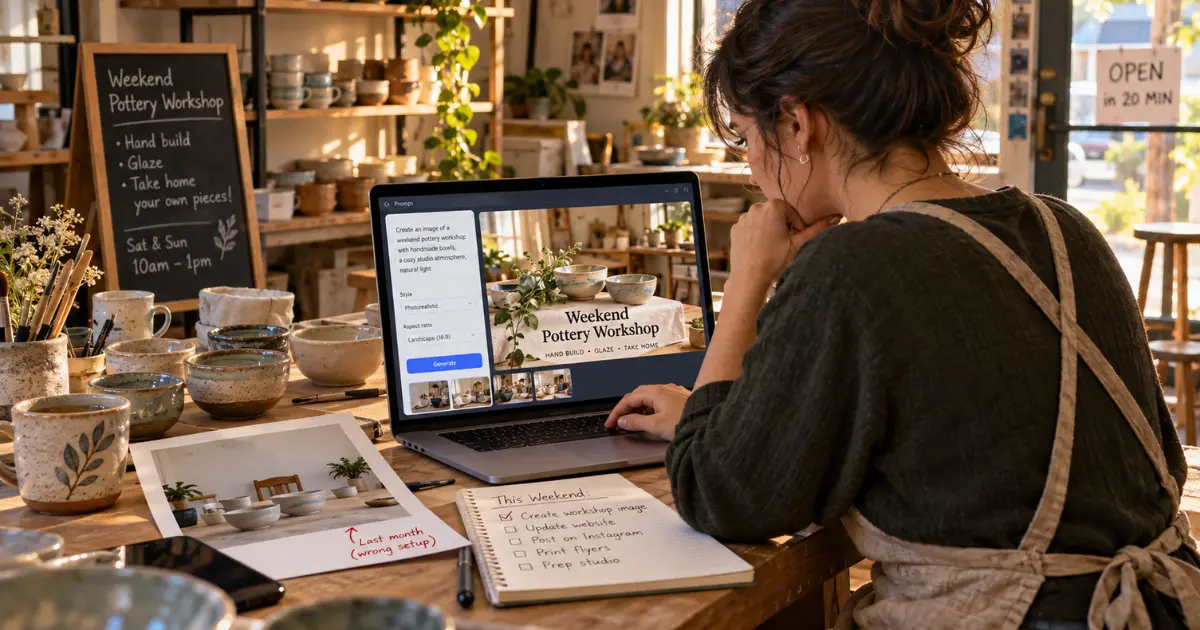
A shop owner has twenty minutes before opening and a weekend workshop to announce. There is a photograph from last month, but it shows the wrong setup. Commissioning a new shoot would be excessive; posting an unrelated stock image would be forgettable. This is a practical place to consider an online image generator and editor such as GPT Image 2. The question is not how many pictures AI can produce. It is whether one picture can support a real message without inventing details that customers will mistake for promises.
- Start With the Post That Is Already Due
- Making the Two Images on GPT Image 2
- 1. Generate the Workshop Concept
- 2. Upload the Existing Studio Photograph
- 3. Finish the Announcement Outside the Image
- The Care Guide Needs a Different Standard of Accuracy
- Friday Is When the Process Either Becomes Easier or Becomes Another Task
- FAQs
- 1. How can small businesses use AI images for marketing?
- 2. What are AI images for small business marketing?
- 3. Can AI image generators replace professional photography?
- 4. How can AI help small businesses save time on marketing?
- 5. What should businesses avoid when using AI-generated images?
- 6. Can AI-generated images be used for social media marketing?
- 7. Should businesses add text to AI-generated images?
- 8. Is AI image editing useful for small businesses?
Start With the Post That Is Already Due
Consider a neighborhood pottery studio with three marketing jobs this week: announce a beginners’ class, publish a care guide, and update an old photograph for an email. The owner does not need a new visual identity. Each task already has a purpose, an audience, and a deadline.
The class announcement needs a welcoming atmosphere and space for a headline. The care guide needs an illustration of hands cleaning a ceramic bowl. The email has a real studio photograph with a distracting delivery carton beside the door. These are three different jobs, even though all three might end as images on a screen.
Before generating, write down what the reader must learn from each post. Keep class times and booking instructions in editable text. Use a real photograph if the exact room or finished pottery is the selling point. Let an illustration communicate an idea without implying it documents a specific event.
Tuesday’s Workshop Announcement Is a Composition Problem
The studio has decided to use a generated image for the announcement because it wants an inviting concept, not a claim about a specific class photograph. The owner initially tries “beautiful pottery workshop” and receives a busy room without space for the words “Saturday Beginners’ Class.”
The problem is not the pottery. It is the framing. A revised description asks for a bright ceramics table, a few unfinished clay bowls, natural window light, and a wide composition with clear space on the left. This makes the visual compatible with the announcement rather than simply attractive in isolation.
Making the Two Images on GPT Image 2
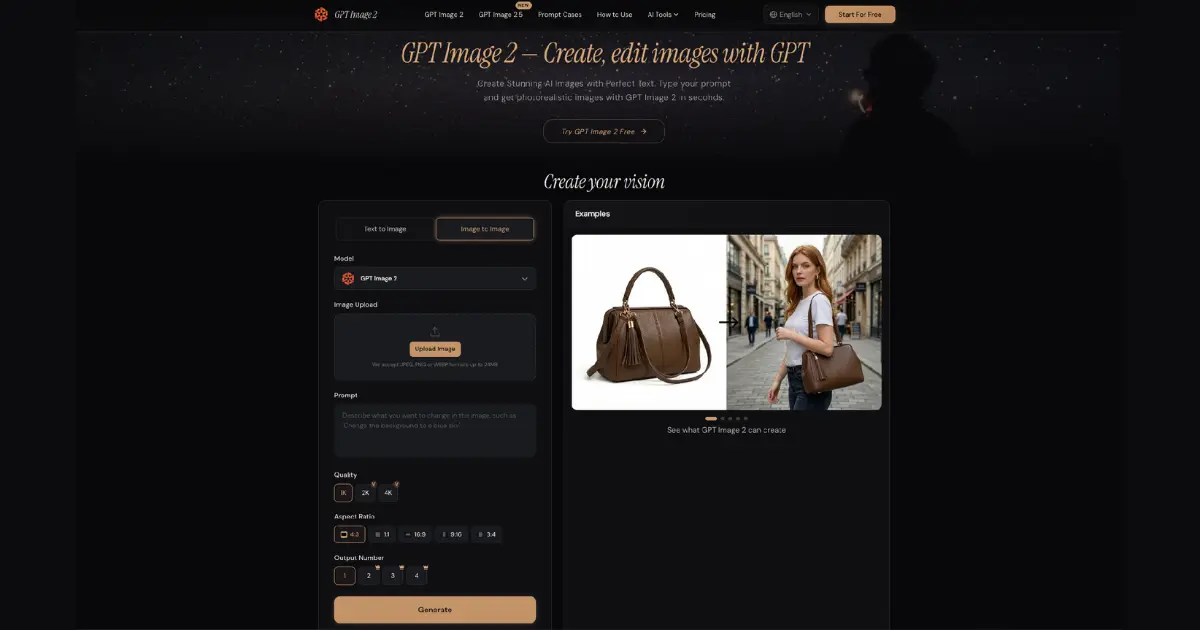
The studio can treat creation and editing as separate visits to the same interface rather than forcing one method onto every asset.
1. Generate the Workshop Concept
Choose Text to Image, enter the workshop description, and select an aspect ratio that suits the intended placement. The interface also offers quality and output-number choices. Start with a manageable number of results; the aim is to find a usable composition, not to fill a folder with variations. Generate, inspect where the headline will go, and revise the description if the focal objects crowd that space.
2. Upload the Existing Studio Photograph
For the email photo, switch to Image to Image and upload the real picture. Ask to preserve the pottery shelves, room layout, lighting, and camera angle while replacing the carton with a continuation of the floor and wall. GPT Image 2 supports uploaded-image editing through a written prompt, so the original can remain the visual starting point. Compare the edited image with the source, especially around the removed object.
3. Finish the Announcement Outside the Image
Add the exact date and booking information in a design or publishing tool after selecting the illustration. If the date changes, nobody needs to generate another room. The image provides atmosphere; an editable copy carries the facts. Preview the finished announcement at phone size to make sure the headline and pottery remain clear.
The Care Guide Needs a Different Standard of Accuracy
Wednesday’s blog article explains how customers should wash handmade ceramic pieces. It might seem efficient to generate an image of a branded bowl from the studio, but that could accidentally change the glaze or decoration. A generic instructional illustration is safer if it is clearly used as an illustration rather than a photograph of merchandise.
The owner can ask for a close view of hands gently washing an unbranded ceramic bowl in a kitchen sink, with a simple background and a clear view of the action. The article itself should supply the real care instructions. The generated image should not be the sole source of an important procedure.
If a specific product is being discussed, photograph that product instead. The distinction takes only a moment to make, yet it helps prevent an attractive AI image from undermining what the business is trying to communicate.
Review the Week as a Customer Would
The owner sees three attractive images. A customer sees a class, a care tip, and a real studio. Before publishing, the owner should review each visual in that order: what would someone believe after looking at it?
On the class graphic, is the room obviously illustrative, and are the time and booking details correct in the surrounding copy?
In the care guide, does the image reinforce the written advice without implying that a fictional bowl is a studio product?
In the edited email photo, did the carton disappear without changing real room features or the pottery on display?
This review is more useful than asking whether all three images share exactly the same style. They do not perform exactly the same job. Consistency comes from recognizable tone and honest presentation, not identical staging.
One Small Change Can Support More Than One Message
The studio might use the workshop illustration once in a feed post and again in its email, but not by assuming one crop suits both. The feed image needs a focal point visible at phone size. The email may need more room above the subject for a short title. Rather than stretching the file, the owner can return to the visual brief and request a composition that fits the second placement.
This is also the moment to resist making unnecessary changes. The clay bowls do not need different colors simply because the image is reused. Preserve the subject and tone that already support the message. A second version should solve a second layout problem, not invent a new campaign every time the same class is announced.
Friday Is When the Process Either Becomes Easier or Becomes Another Task
Save the Decisions That Worked
At the end of the week, save the source photograph, the approved edit, and the prompt that gave the workshop illustration its usable composition. Record one sentence about why each worked. “Room on left for title” is better than “great prompt.” Next month’s workshop graphic can borrow that composition without copying the entire scene.
Stop When Another Method Fits Better
If a job consistently takes many rounds, reconsider whether AI is the right starting point. A real product photograph may need conventional retouching. A text-heavy schedule may be easier to build in a simple layout template. The small-business advantage is having options, not using generation at every opportunity.
Track the posts that actually got published. That is the meaningful measure for a team with limited time: did the visual help communicate a real offer, article, or update? A pile of unused images does not answer that question.
Conclusion
Small-business marketing becomes more manageable when visual tasks are separated by purpose. Generate an illustrative scene when there is no suitable photo, edit an existing image when its important content is already correct, and use real photography when a customer needs to see something factual. The pottery studio’s week offers a modest model: one workshop concept, one useful article illustration, and one cleaned-up source photo. Begin with the post already on your calendar, decide what the image must communicate, and let the simplest suitable method do that job.
FAQs
1. How can small businesses use AI images for marketing?
Small businesses can use AI images to create social media visuals, promotional graphics, blog illustrations, email images, and marketing concepts without arranging a photoshoot for every campaign.
2. What are AI images for small business marketing?
AI images for small business marketing are visuals created or edited with AI tools to support activities such as social media promotion, email marketing, blog content, product education, and advertising.
3. Can AI image generators replace professional photography?
Not always. AI images work well for concepts, illustrations, and general marketing visuals, but real photography is usually better when customers need to see an actual product, location, person, or event accurately.
4. How can AI help small businesses save time on marketing?
AI can speed up visual creation and editing, allowing businesses to generate concepts, remove distracting objects, create illustrations, and adapt visuals for different marketing channels.
5. What should businesses avoid when using AI-generated images?
Businesses should avoid creating visuals that could mislead customers. For example, an AI-generated product, store, event, or customer experience should not be presented as a real photograph if it does not accurately represent reality.
6. Can AI-generated images be used for social media marketing?
Yes. Businesses can use AI-generated images for social media posts, announcements, educational content, promotional campaigns, and other visual content, provided the images accurately support the message.
7. Should businesses add text to AI-generated images?
For important information such as dates, prices, booking instructions, and offers, it is usually better to add text using a design or publishing tool. This makes the information easier to edit and helps avoid errors in AI-generated text.
8. Is AI image editing useful for small businesses?
Yes. AI editing can help improve existing photographs by removing distractions, adjusting elements, or creating variations while preserving important parts of the original image.

Sandeep Kumar is the Founder & CEO of Aitude, a leading AI tools, research, and tutorial platform dedicated to empowering learners, researchers, and innovators. Under his leadership, Aitude has become a go-to resource for those seeking the latest in artificial intelligence, machine learning, computer vision, and development strategies.