
What Are the Benefits of Using a Background Remover?
Photo editing has become an essential part of digital marketing, e-commerce, social media, and personal branding. However, creating clean and professional images often requires removing distracting backgrounds, which used to demand advanced editing skills and expensive software. Today, an AI background remover, using artificial intelligence to automatically detect subjects and separate them from the background, makes the process simple, fast, and accessible to everyone.
As a result, users can create transparent images, erase background free, or enhance visual content within seconds. Some common use cases for background removal include: e-commerce product photography, social media content creation, professional headshots and portraits, graphic design projects, ect. So why is background removal necessary? It offers more than visual improvements:
- Saves editing time – Traditional editing methods often require manually selecting subjects pixel by pixel. Modern AI tools automate the process, delivering results within seconds.
- Supports branding consistency – Consistent visuals strengthen brand recognition. Therefore, businesses can use identical backgrounds across product listings and marketing materials.
- Enhances creative flexibility – Once a background is removed, users can place subjects anywhere. As a result, creative possibilities become virtually unlimited.

Online Free AI Background Remover – UltraPic
Modern users want powerful tools without steep learning curves. UltraPic addresses this need by offering an accessible and efficient solution. It is a free online image editing platform that allows to automatically detect subjects and remove backgrounds from photos. And it operates directly through a web browser, requiring no downloads or installations.
The platform is designed for users of all experience levels. Whether you’re a beginner editing your first image or a business owner managing hundreds of product photos, UltraPic streamlines the process. You simply upload an image, and the system automatically creates a new image with a transparent backdrop. Now, let’s take a closer look at its standout features:
- Precise Subject Detection: The app intelligently and accurately identifies people, products, animals, vehicles, and other objects without requiring manual selection.
- Fast Processing Speed: It processes images within seconds, allowing you to complete projects swiftly; and it offers batch BG removal for up to 50 images at the same time.
- High-Quality Edge Detection: Accurately separating subjects from backgrounds can be challenging, especially around hair, fur, or intricate details.
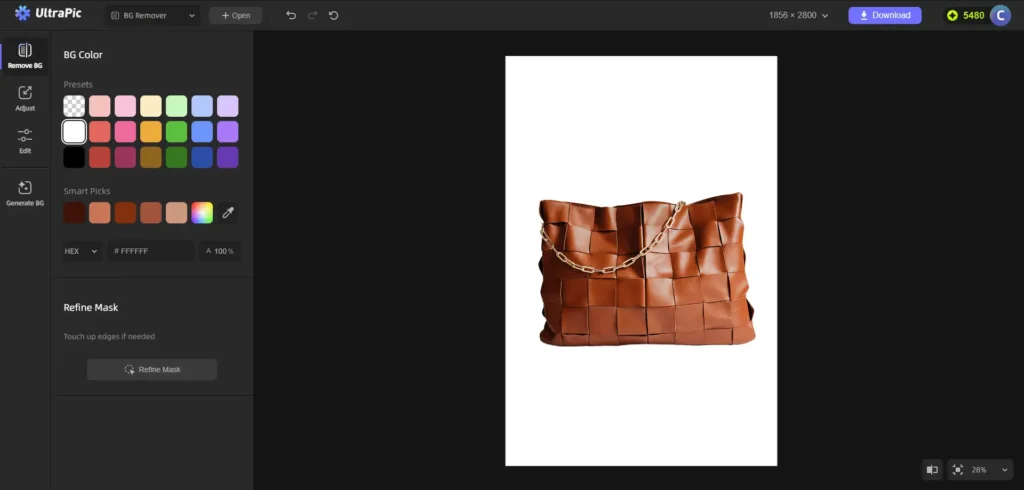
- Background Replacement: After removing a background, it allows to instantly replace it with solid colors, custom images, professional studio scenes, or creative visual environments
- AI Image Enhancement: It allows to improves image quality to 4K using intelligent enhancement algorithms, making ordinary photos polished and professional.
- More Image Editing Tools: It also comes with other photo editing functions like object removal, AI photo retouching, AI generative fill, removing watermark, and so on.
With these features, UltraPic stands out as a practical solution for fast background removal and professional image editing.
How to Use UltraPic for Fast and Professional Photo Editing
After selecting the right tool, let us get down to how to use the UltraPic for background removal and other image editting tasks effectively.
Step 1: Upload Your Image
Begin by opening the UltraPic app in your browser, drop an image, or click the Upload image button and select the image you want to edit.
Tip: The UlraPic platform supports common image formats including PNG, JPEG / JPG / JFIF / PJP / PJEPG, WEBP, and BMP.
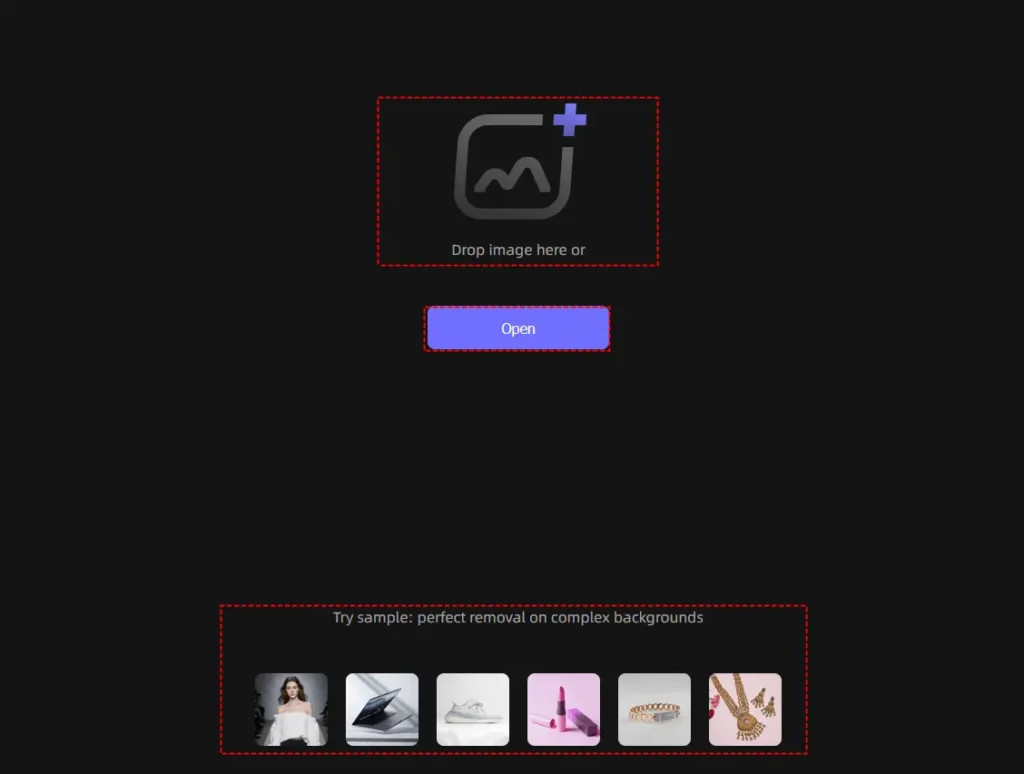
Step 2: Let the AI Analyze the Image
After uploading, the AI Background Remover automatically scans the image and identifies the primary subjects on the photo, then it separates the foreground from the background while preserving important details – this process typically takes only a few seconds.
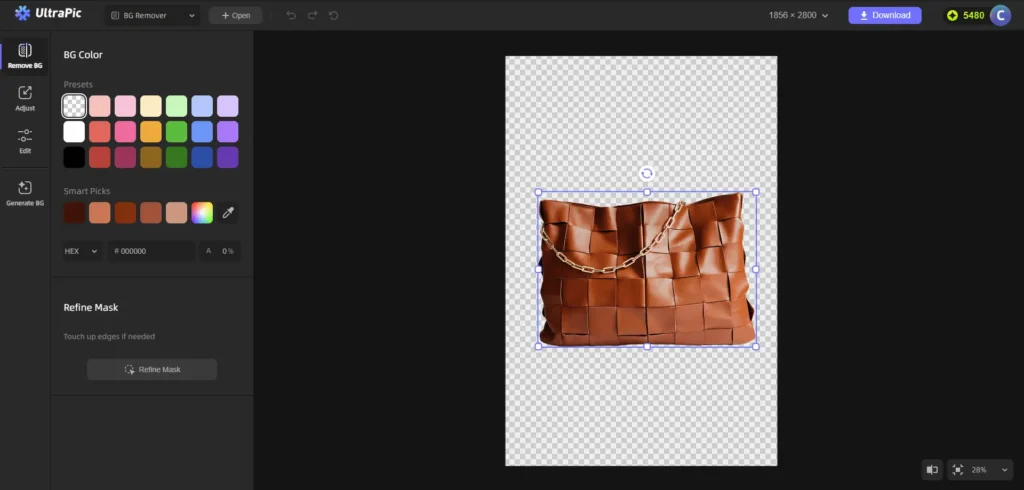
Step 3: Review & Download the Edited Image
Inspect the image carefully, especailly paying attention to hair edges, clothing details, small accessories, and product outlines. You can touch up edges using Refine Mask if needed. When it’s done, click Download to export the transparent background image with a PNG or JPEG format.
After background removal, you can easily enhance the image further by adding a new background, removing unwanted objects via Magic Eraser, adding/replacing objects in photo via AI Generative Fill.
- Pro Tips for Achieving Better Image Results
- Use high-quality source images – Higher-quality photos produce more accurate background removal results.
- Choose well-lit subjects – Good lighting improves subject detection and edge accuracy.
- Maintain clear subject separation – Subjects that contrast with their backgrounds are easier to process.
- Apply consistent branding – Use similar backgrounds and editing styles across marketing materials.
- Optimize for platform requirements – Different platforms have different image specifications. Therefore, adjust dimensions and formats accordingly (Supported on UltraPic).
Who Should Use UltraPic?
E-Commerce Sellers
Online stores constantly require professional product images. UltraPic helps sellers quickly prepare product photos for Amazon, Shopify, WooCommerce, Etsy, eBay, Walmart, and many other marketplaces.
Graphic Designers
Designers often spend significant time isolating subjects before beginning creative work. UltraPic accelerates this process, allowing designers to focus on creativity instead of repetitive editing.
Content Creators
YouTubers, bloggers, Instagram creators, TikTok influencers, and marketers can easily produce eye-catching thumbnails, promotional graphics, and social media content.
Photographers
Professional photographers can streamline portrait editing by quickly removing or replacing distracting backgrounds.
Small Businesses
Businesses without dedicated design teams can create polished promotional materials, advertisements, and product catalogs without hiring professional editors.
FAQs about AI Background Removal
Here, let’s address some of the most common questions users have about AI-powered background removal technology.
Does Background Removal Affect Image Quality?
A high-quality AI Background Remover is designed to preserve image quality while accurately separating the subject from the background.
Can I Use Removed Background Images for Business Purposes?
Of course, Yes. Businesses commonly use background-removed images for product listings, advertising campaigns, social media content, and corporate branding materials.
Can Beginners Use an AI Background Remover?
Absolutely. Most platforms are designed with user-friendly interfaces that require little to no editing experience.
Is an AI Background Remover better than Manual Editing?
For most users, yes. AI delivers faster results while maintaining high accuracy. Additionally, it eliminates the need for advanced editing skills.
Is Online Background Removal Safe?
Reputable platforms typically prioritize user privacy and secure image processing. Users should always review platform policies when uploading sensitive content.
Conclusion
An AI Background Remover has transformed modern photo editing by making professional-quality results accessible to everyone. Instead of spending hours on manual editing, users can remove backgrounds, replace scenes, and enhance images within minutes.
UltraPic offers a practical solution through its free online platform, powerful automation, and user-friendly interface. Moreover, its advanced features extend beyond simple background removal, providing a complete photo editing workflow, like object removal, object replacement, one click photo retouching, old photo restoration, and so forth. Just give the free image editor a try now!

Sandeep Kumar is the Founder & CEO of Aitude, a leading AI tools, research, and tutorial platform dedicated to empowering learners, researchers, and innovators. Under his leadership, Aitude has become a go-to resource for those seeking the latest in artificial intelligence, machine learning, computer vision, and development strategies.