DocuSign : AI-Powered Agreement Management Explained
Managing agreements has become more complex than simply collecting signatures. Sales contracts, vendor agreements, employment offers, NDAs, procurement documents, and compliance paperwork all move through multiple people, systems, and approval stages. Even a small delay can slow revenue, create legal risks, or frustrate customers.
- DocuSign : AI-Powered Agreement Management Explained
- What Is DocuSign?
- What Is Intelligent Agreement Management (IAM)?
- Why Traditional Agreement Management Falls Short
- How DocuSign Intelligent Agreement Management Works
- Step 1: Create the Agreement
- Step 2: Review Content
- Step 3: AI Analyzes the Document
- Step 4: Collect Electronic Signatures
- Step 5: Store Agreements Securely
- Step 6: AI Monitors Agreements
- Core Components of the IAM Platform
- AI Features That Make DocuSign Different
- AI Clause Extraction
- Key Features of DocuSign
- Benefits of Using DocuSign
- Real-World Use Cases
- Best Practices for Implementing DocuSign
- Standardize Templates
- Define Approval Rules
- Organize Agreements
- Train Employees
- Review AI Recommendations
- Common Mistakes to Avoid
- Agreement Lifecycle Workflow
- DocuSign Integrations
- DocuSign Pricing Overview
- Future of AI-Powered Agreement Management
- Pros and Cons
- Final Key Takeaways
This is where DocuSign has evolved beyond electronic signatures. Its Intelligent Agreement Management (IAM) platform combines AI, workflow automation, and secure eSignatures to help businesses create, review, sign, organize, and analyze agreements throughout their entire lifecycle. Instead of treating contracts as static files, IAM turns them into searchable business assets that provide valuable insights and automate repetitive tasks.
In this guide, you’ll learn what DocuSign is, how Intelligent Agreement Management works, its AI-powered capabilities, and why organizations are adopting it to modernize agreement processes.
What Is DocuSign?
DocuSign is a cloud-based agreement platform that enables organizations to prepare, sign, manage, and automate agreements digitally using electronic signatures and AI-powered workflow automation.
Although many people know DocuSign as an electronic signature solution, the platform has expanded significantly. Today, it supports the complete agreement lifecycle, from document creation and negotiation to approval, signing, storage, renewal tracking, and contract analysis.
Businesses of all sizes use DocuSign to reduce paperwork, speed up approvals, improve compliance, and eliminate manual processes that often slow operations.
Unlike traditional document management systems, DocuSign focuses specifically on agreements. Every feature is designed to simplify how contracts move between employees, customers, vendors, and partners while maintaining security and regulatory compliance.
Common Types of Agreements Managed in DocuSign
- Employment contracts
- Sales agreements
- Vendor contracts
- Purchase orders
- Service agreements
- Non-disclosure agreements (NDAs)
- Lease agreements
- Insurance documents
- Healthcare consent forms
- Financial agreements
Because nearly every organization relies on contracts, DocuSign has become a common tool across industries including healthcare, finance, manufacturing, education, government, real estate, and technology.
Why Businesses Use DocuSign
Organizations adopt DocuSign for several reasons:
- Reduce paperwork and printing costs
- Accelerate approval cycles
- Enable remote signing from any device
- Improve document security
- Track agreement status in real time
- Reduce manual data entry
- Automate repetitive workflows
- Maintain detailed audit trails
For many companies, these improvements translate into faster sales cycles, smoother employee onboarding, and fewer administrative bottlenecks.
Pro Tip: If your team still emails PDF files back and forth for approvals, you’re likely spending more time than necessary on agreement management. A centralized platform can eliminate many of those manual steps.
What Is Intelligent Agreement Management (IAM)?
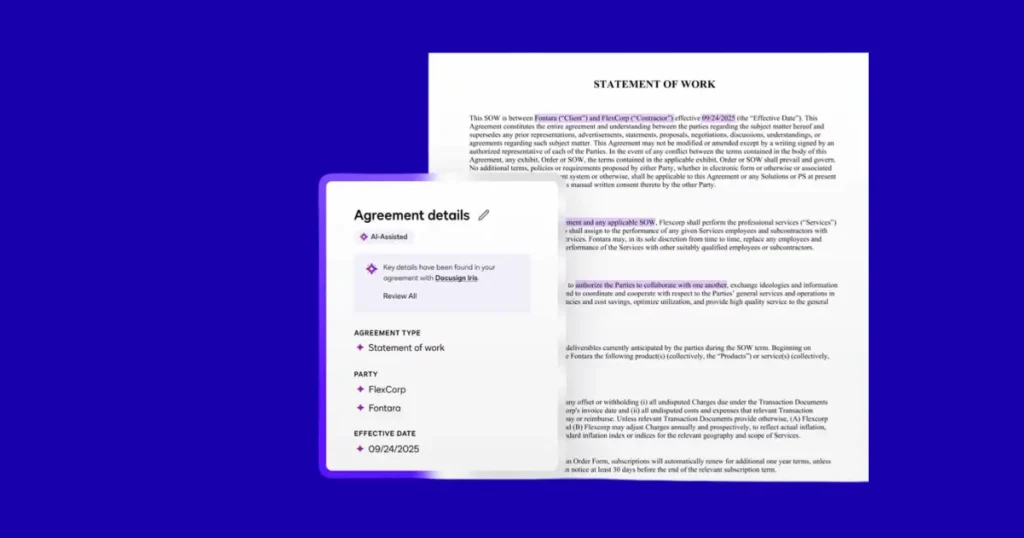
Intelligent Agreement Management (IAM) is DocuSign’s AI-powered platform that helps businesses create, sign, analyze, manage, and automate agreements throughout their entire lifecycle.
Traditional contract software often stops after a document is signed. Important information remains locked inside PDFs, making it difficult to search for renewal dates, payment terms, obligations, or compliance requirements.
IAM changes this by using artificial intelligence to understand agreement content rather than simply storing documents.
Instead of treating contracts as static files, the platform identifies important information such as:
- Expiration dates
- Renewal terms
- Payment obligations
- Parties involved
- Contract values
- Approval status
- Key clauses
- Business risks
This allows organizations to find agreements quickly, monitor deadlines, automate follow-up actions, and gain valuable business insights without manually reviewing hundreds of contracts.
The Three Stages of Intelligent Agreement Management
DocuSign organizes IAM into three connected stages.
1. Create
The process begins with drafting agreements using templates, reusable clauses, document generation tools, or integrations with existing business applications.
AI can assist by suggesting content, organizing templates, and helping standardize documents across teams.
2. Commit
Once the agreement is ready, it moves through approval workflows before electronic signatures are collected.
IAM tracks every step, verifies participants, records timestamps, and maintains an audit trail for compliance.
3. Manage
After signing, agreements continue providing value.
Rather than sitting in folders, they become searchable records that AI can analyze for renewal opportunities, obligations, compliance issues, and reporting.
This lifecycle approach helps businesses treat agreements as ongoing assets instead of completed paperwork.
Why Traditional Agreement Management Falls Short
Many organizations still rely on manual processes that were designed years ago. While these methods may work for small teams, they often become inefficient as the business grows.
Common Challenges
| Traditional Process | Business Impact |
|---|---|
| Emailing PDFs | Version confusion |
| Manual approvals | Slow turnaround |
| Paper signatures | Delayed agreements |
| Local file storage | Difficult searching |
| Spreadsheet tracking | Missed renewals |
| Manual reviews | Higher legal risk |
These inefficiencies affect multiple departments.
Sales teams wait longer for signed contracts.
HR departments spend additional time onboarding employees.
Legal teams manually review repetitive agreements.
Procurement departments struggle to monitor vendor obligations.
Finance teams chase missing approvals before processing payments.
The result is slower operations and increased administrative costs.
Real-World Example
Imagine a company managing 2,000 supplier agreements.
Each contract contains different renewal dates, pricing terms, service-level agreements, and compliance requirements.
Without AI, employees may need to open hundreds of PDF files individually to locate a single renewal clause.
With Intelligent Agreement Management, the system extracts this information automatically, making it searchable and easier to monitor.
How DocuSign Intelligent Agreement Management Works
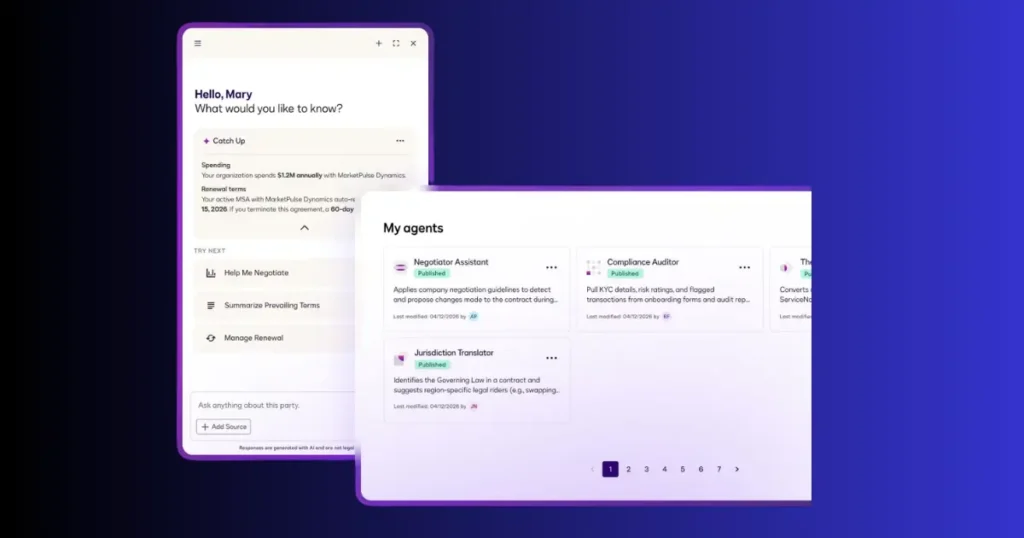
At a high level, the platform follows a continuous workflow that combines automation, AI, and electronic signatures.
Step 1: Create the Agreement
Teams build agreements using templates or document generation tools.
This reduces repetitive work and keeps documents consistent.
Step 2: Review Content
Stakeholders review the agreement.
Approvers receive notifications automatically based on predefined workflows.
Step 3: AI Analyzes the Document
Artificial intelligence identifies important information, including:
- Contract value
- Dates
- Parties
- Clauses
- Renewal terms
- Obligations
- Risks
Instead of manually reading every page, users can quickly understand what matters most.
Step 4: Collect Electronic Signatures
Recipients receive secure signing requests that work across desktop and mobile devices.
Identity verification and authentication options help ensure the right people sign the document.
Step 5: Store Agreements Securely
After signing, agreements are stored in a centralized repository.
This makes searching, filtering, and retrieving contracts much easier than relying on local folders or email attachments.
Step 6: AI Monitors Agreements
The process doesn’t stop after signing.
AI continues identifying upcoming renewals, compliance deadlines, and contract obligations so businesses can take action before issues arise.
Core Components of the IAM Platform
The Intelligent Agreement Management platform combines several capabilities into one ecosystem.
| Component | Purpose |
|---|---|
| Document Generation | Create agreements faster |
| Workflow Automation | Route approvals automatically |
| Electronic Signatures | Secure digital signing |
| AI Analysis | Extract important contract data |
| Agreement Repository | Centralized storage |
| Search | Find contracts instantly |
| Reporting | Business insights |
| Integrations | Connect CRM, ERP, HR, and productivity tools |
Together, these components reduce manual work while improving visibility across the entire agreement lifecycle.
AI Agreement Workflow
Create Agreement
        ↓
Review & Approvals
        ↓
AI Extracts Key Information
        ↓
Electronic Signature
        ↓
Agreement Repository
        ↓
AI Monitors Deadlines
        ↓
Renewal Notifications
        ↓
Business Insights & Reporting
AI Features That Make DocuSign Different
Electronic signatures may be the most recognizable feature of DocuSign, but its AI capabilities are what set the Intelligent Agreement Management (IAM) platform apart. Instead of simply storing signed documents, the platform helps you understand, organize, and act on the information inside your agreements.
Whether you’re managing ten contracts or ten thousand, AI can reduce manual reviews, surface important clauses, and automate routine tasks across the agreement lifecycle.
AI Agreement Summary
AI Agreement Summary automatically creates concise overviews of lengthy contracts, making it easier to understand key terms without reading every page.
Legal agreements often span dozens of pages. Finding critical information such as payment terms, renewal dates, termination clauses, or confidentiality obligations can take time.
DocuSign AI scans the document and highlights the most important details in a readable summary.
Instead of searching through multiple sections, users can quickly review:
- Contract purpose
- Parties involved
- Effective dates
- Renewal terms
- Payment obligations
- Key responsibilities
- Termination conditions
Business Example
A sales manager receives a 45-page enterprise agreement from a customer. Rather than reading the entire document immediately, they can review the AI-generated summary to understand pricing, contract duration, and approval requirements before sharing it with the legal team.
AI Clause Extraction
Clause extraction identifies important legal provisions automatically and organizes them into structured data.
Instead of manually locating clauses in every agreement, AI extracts information such as:
- Confidentiality clauses
- Liability limitations
- Governing law
- Auto-renewal terms
- Service-level agreements
- Payment schedules
- Data privacy requirements
This makes contracts easier to search, compare, and manage.
Why It Matters
If your company has hundreds of vendor agreements, finding every contract with an automatic renewal clause could take days manually. AI can identify those agreements within minutes.
AI Metadata Extraction
Every agreement contains valuable information beyond the document itself.
AI automatically captures metadata including:
- Customer name
- Vendor name
- Contract value
- Effective date
- Expiration date
- Department
- Agreement type
- Status
This structured data improves reporting and makes filtering agreements much faster.
AI Search
Searching folders for contracts using filenames is inefficient.
DocuSign‘s AI-powered search helps users find agreements based on their actual content.
Instead of searching only by file name, you can search for:
- Vendor names
- Renewal dates
- Payment amounts
- Specific clauses
- Products
- Services
- Customer names
This significantly reduces the time spent locating important agreements.
AI Risk Detection
One of the most valuable enterprise features is identifying potential contract risks before signing.
AI can flag:
- Missing clauses
- Unusual payment terms
- Conflicting language
- Compliance issues
- Inconsistent contract wording
While AI does not replace legal professionals, it helps reviewers focus on areas that may require closer attention.
Expert Tip: AI should support legal review, not replace it. Final approval should always come from qualified legal professionals when agreements involve significant financial or regulatory obligations.
AI Insights and Reporting
Agreements contain business intelligence that often goes unused.
DocuSign AI helps organizations answer questions such as:
- Which contracts expire next month?
- Which customers have unsigned agreements?
- Which vendors require renewal?
- How long do approvals typically take?
- Which departments process the most agreements?
These insights help improve operational efficiency and planning.
Key Features of DocuSign
Beyond AI, DocuSign includes a comprehensive set of tools for managing agreements from creation to completion.
| Feature | Benefit |
|---|---|
| Electronic Signatures | Legally binding digital signatures |
| Agreement Templates | Faster document creation |
| Approval Workflows | Automated routing |
| Document Generation | Consistent agreements |
| Identity Verification | Increased security |
| Audit Trails | Complete signing history |
| Mobile Signing | Sign from anywhere |
| Bulk Sending | Send documents to multiple recipients |
| Agreement Repository | Centralized storage |
| AI Contract Analysis | Faster document understanding |
| Reporting Dashboard | Business insights |
| API Integrations | Connect existing business systems |
Together, these features eliminate many repetitive administrative tasks while improving consistency across departments.
Benefits of Using DocuSign

Implementing an AI-powered agreement platform can improve efficiency across nearly every business function.
Faster Agreement Completion
Manual approvals often delay important contracts.
Automated workflows ensure agreements move to the right people immediately, reducing turnaround time.
Example
Instead of waiting several days for an approval email, managers receive automated notifications and can sign from any device.
Improved Accuracy
Manual data entry increases the risk of errors.
Using templates, reusable clauses, and AI-assisted document generation helps maintain consistency across agreements.
Better Visibility
A centralized agreement repository gives teams a clear view of:
- Agreement status
- Approval progress
- Upcoming renewals
- Contract values
- Outstanding signatures
This visibility reduces uncertainty and improves planning.
Reduced Administrative Work
Routine tasks such as:
- Sending reminders
- Collecting signatures
- Filing agreements
- Tracking renewals
can all be automated, allowing employees to focus on higher-value work.
Stronger Compliance
Audit trails record every important action, including:
- Document creation
- Edits
- Approval timestamps
- Signature events
- Authentication details
This supports regulatory and internal compliance requirements.
Real-World Use Cases
Sales Teams
Sales representatives frequently manage proposals, quotes, and customer contracts.
Using DocuSign helps:
- Close deals faster
- Reduce paperwork
- Track customer signatures
- Automate approvals
Human Resources
HR departments use agreements throughout the employee lifecycle.
Examples include:
- Offer letters
- Employment contracts
- Policy acknowledgments
- Performance documentation
- Offboarding agreements
Automating these documents speeds onboarding while improving consistency.
Procurement
Procurement teams manage vendor relationships involving:
- Purchase agreements
- Supplier contracts
- Service agreements
- Renewal tracking
AI helps monitor contract obligations and upcoming renewal deadlines.
Legal Departments
Legal teams often spend significant time reviewing repetitive agreements.
AI assists by:
- Summarizing documents
- Extracting clauses
- Organizing agreements
- Improving searchability
This allows legal professionals to focus on higher-risk reviews.
Healthcare
Healthcare organizations use secure digital agreements for:
- Patient consent forms
- Provider agreements
- Vendor contracts
- Compliance documentation
Electronic signatures simplify patient experiences while reducing paperwork.
Financial Services
Banks and financial institutions process agreements involving:
- Loans
- Account opening
- Investment services
- Insurance
- Mortgage documentation
Digital workflows improve customer experiences while maintaining compliance requirements.
Best Practices for Implementing DocuSign
Successful adoption depends on more than installing software.
Consider these best practices:
Standardize Templates
Use approved agreement templates to reduce inconsistencies.
Define Approval Rules
Automate approval routing based on:
- Contract value
- Department
- Region
- Customer type
Organize Agreements
Use consistent naming conventions and metadata to simplify searching later.
Train Employees
Even intuitive software requires training.
Ensure employees understand:
- Workflow automation
- Signature processes
- Security practices
- Document management
Review AI Recommendations
AI accelerates review but should complement human decision-making rather than replace it.
Common Mistakes to Avoid
Treating DocuSign Only as an eSignature Tool
Many organizations use only electronic signatures while ignoring automation, AI analysis, and reporting capabilities.
Poor Document Organization
Without standardized folders, templates, and metadata, agreements become difficult to manage as volume grows.
Skipping Approval Workflows
Bypassing approval automation often leads to inconsistent processes and delayed agreements.
Ignoring Renewal Dates
Missing contract renewals can create unnecessary costs or service interruptions.
Use automated reminders whenever possible.
Not Reviewing AI Output
AI improves efficiency but should always be validated when agreements involve complex legal, financial, or regulatory terms.
Pro Tips
✅ Build standardized agreement templates before automating workflows.
✅ Use AI summaries to accelerate initial contract reviews.
✅ Store all agreements in one centralized repository.
✅ Monitor renewal dates proactively instead of reacting at the last minute.
✅ Connect DocuSign with your CRM, ERP, and HR systems to reduce duplicate data entry.
Agreement Lifecycle Workflow
Create Agreement
        ↓
Select Approved Template
        ↓
Internal Review
        ↓
AI Contract Analysis
        ↓
Approval Workflow
        ↓
Electronic Signature
        ↓
Secure Storage
        ↓
AI Monitoring
        ↓
Renewal Alerts
        ↓
Reporting & Analytics
Key Takeaways
- DocuSign’s AI capabilities extend far beyond electronic signatures by helping users summarize agreements, extract clauses, identify risks, and automate repetitive tasks.
- Organizations across sales, HR, legal, procurement, healthcare, and finance can use Intelligent Agreement Management to improve efficiency, visibility, and compliance.
- Successful implementation relies on standardized templates, automated workflows, organized agreement repositories, and thoughtful use of AI alongside human expertise.
DocuSign Integrations

DocuSign becomes even more powerful when connected to the business applications your team already uses. Instead of switching between multiple platforms or entering the same information repeatedly, integrations allow agreement data to flow automatically across your technology stack.
This reduces manual work, minimizes errors, and speeds up business processes.
Popular DocuSign Integrations
| Platform | Use Case |
|---|---|
| Salesforce | Generate and send contracts from CRM records |
| Microsoft 365 | Sign and manage documents in Word and Outlook |
| Google Workspace | Prepare, share, and sign files stored in Google Drive |
| HubSpot | Automate sales agreements and customer approvals |
| SAP | Procurement and enterprise contract workflows |
| Oracle | Financial and procurement agreement management |
| Workday | HR onboarding and employment agreements |
| Slack | Receive approval and signature notifications |
| Box | Secure document storage and collaboration |
| Dropbox | Manage signed agreements in cloud storage |
| ServiceNow | IT and internal approval workflows |
| APIs | Build custom agreement workflows into business applications |
Why Integrations Matter
Imagine a sales representative closes a deal in Salesforce.
Instead of manually creating a PDF, emailing the customer, downloading the signed document, and uploading it back into the CRM, DocuSign automates the entire process.
This saves time while reducing administrative work.
Security and Compliance
When agreements contain sensitive customer, financial, or legal information, security becomes a top priority.
DocuSign includes multiple layers of protection designed to safeguard documents throughout the agreement lifecycle.
Key Security Features
- Data encryption
- Secure cloud storage
- Authentication options
- Identity verification
- Role-based access controls
- Digital audit trails
- Tamper-evident documents
- Permission management
Every signature event is recorded with timestamps and participant details, creating a verifiable history of document activity.
Compliance Support
Organizations in regulated industries often require compliance with standards such as:
- GDPR
- HIPAA (where applicable to customer implementation)
- SOC certifications
- ISO security standards
- Electronic signature regulations such as ESIGN and UETA in the United States
- eIDAS in the European Union
Best Practice: Security features are most effective when combined with strong internal policies, employee training, and access management.
DocuSign Pricing Overview
DocuSign offers multiple plans designed for individuals, small businesses, and large enterprises.
Although pricing changes over time, plans generally fall into these categories:
| Plan | Best For |
|---|---|
| Personal | Individual users |
| Standard | Small businesses |
| Business Pro | Growing organizations |
| Enhanced Plans | Large teams |
| Enterprise | Large organizations with advanced workflows |
| Intelligent Agreement Management | Businesses requiring AI-powered agreement automation |
Enterprise pricing usually depends on:
- Number of users
- Required integrations
- AI capabilities
- Workflow complexity
- Security requirements
- API usage
Before selecting a plan, evaluate both your current agreement volume and expected future growth.
DocuSign vs Competitors
Many organizations compare DocuSign with other electronic signature and agreement management platforms.
Feature Comparison
| Feature | DocuSign | Adobe Acrobat Sign | PandaDoc | Dropbox Sign |
|---|---|---|---|---|
| Electronic Signatures | ✅ | ✅ | ✅ | ✅ |
| AI Agreement Analysis | ✅ | Limited | Limited | Limited |
| Workflow Automation | ✅ | ✅ | ✅ | Basic |
| Contract Repository | ✅ | Limited | ✅ | Basic |
| Enterprise Scalability | Excellent | Excellent | Good | Moderate |
| CRM Integrations | Extensive | Good | Good | Moderate |
| API Support | Extensive | Extensive | Good | Good |
| Agreement Lifecycle Management | Advanced | Moderate | Moderate | Basic |
When to Choose DocuSign
DocuSign is a strong choice if your organization needs:
- Enterprise-scale agreement management
- AI-powered contract analysis
- Advanced workflow automation
- Extensive third-party integrations
- High compliance requirements
- Large agreement repositories
When Another Platform May Be Suitable
Smaller businesses with basic signing needs and limited automation requirements may find simpler eSignature platforms sufficient.
The right choice depends on your agreement volume, budget, compliance needs, and long-term workflow goals.
Future of AI-Powered Agreement Management
Agreement management is evolving rapidly.
Over the next few years, AI is expected to play an even larger role in helping organizations:
- Draft agreements faster
- Identify legal risks earlier
- Predict renewal opportunities
- Recommend contract language
- Automate negotiations for routine agreements
- Improve compliance monitoring
- Generate business insights from contract data
Rather than replacing legal professionals, AI will continue to act as an intelligent assistant that reduces repetitive work and helps teams focus on higher-value decisions.
Organizations that modernize agreement workflows today will be better positioned to scale as contract volumes and compliance requirements grow.
Pros and Cons
Pros
- Easy-to-use electronic signatures
- AI-powered agreement insights
- Comprehensive workflow automation
- Secure document management
- Excellent enterprise scalability
- Large integration ecosystem
- Strong compliance capabilities
- Reliable mobile experience
Cons
- Advanced AI features may require premium plans
- Enterprise implementation can take time
- Smaller organizations may not need every capability
- Initial workflow configuration requires planning
Frequently Asked Questions
What is DocuSign?
DocuSign is a cloud-based platform that enables businesses to create, sign, manage, and automate agreements using electronic signatures and AI-powered agreement management tools.
Is DocuSign legally binding?
Yes. Electronic signatures created through DocuSign are generally legally recognized in many jurisdictions when applicable legal requirements are met. Organizations should verify local laws and industry-specific regulations.
What is Intelligent Agreement Management?
Intelligent Agreement Management (IAM) is DocuSign‘s platform for managing agreements throughout their lifecycle using AI, automation, analytics, and electronic signatures.
How does AI improve agreement management?
AI can summarize agreements, extract important clauses, identify key dates, improve search, automate workflows, and surface potential risks, helping teams work more efficiently.
Can DocuSign replace contract lawyers?
No. DocuSign helps automate administrative and analytical tasks, but legal professionals remain essential for reviewing complex agreements, providing legal advice, and making final decisions.
Which industries use DocuSign?
DocuSign is widely used in:
- Healthcare
- Finance
- Technology
- Government
- Manufacturing
- Human Resources
- Legal Services
- Real Estate
- Education
- Retail
Does DocuSign work on mobile devices?
Yes. Users can review, sign, and manage agreements from smartphones and tablets, making it easier to complete approvals while away from the office.
Is DocuSign suitable for small businesses?
Yes. Small businesses can benefit from faster approvals, reduced paperwork, and streamlined agreement workflows. As the business grows, additional automation and AI capabilities can be adopted.
Final Key Takeaways
- DocuSign has evolved beyond electronic signatures. Its Intelligent Agreement Management platform uses AI to help organizations create, manage, analyze, and automate agreements throughout their lifecycle.
- AI enhances productivity without replacing human judgment. Features such as agreement summaries, clause extraction, workflow automation, and searchable repositories reduce repetitive work while allowing legal and business teams to focus on strategic decisions.
- Integrated agreement management delivers long-term value. Connecting agreements with CRM, HR, finance, and productivity tools creates a more efficient, secure, and scalable business process.
Conclusion
Agreements are at the center of almost every business relationship, from hiring employees and closing sales to managing vendors and maintaining compliance. Yet many organizations still rely on fragmented, manual processes that slow operations and make important information difficult to access.
DocuSign addresses these challenges through its Intelligent Agreement Management (IAM) platform, combining secure electronic signatures with AI-powered analysis, workflow automation, centralized agreement storage, and business insights. Instead of viewing contracts as static documents, businesses can transform them into searchable, actionable assets that support better decision-making throughout the agreement lifecycle.
Whether you’re a small business looking to simplify document signing or a large enterprise managing thousands of contracts, DocuSign provides the tools to streamline agreement processes, reduce administrative effort, and improve visibility across teams. By implementing AI thoughtfully alongside human expertise, organizations can build faster, more secure, and more efficient agreement workflows that are ready for the future.

Sandeep Kumar is the Founder & CEO of Aitude, a leading AI tools, research, and tutorial platform dedicated to empowering learners, researchers, and innovators. Under his leadership, Aitude has become a go-to resource for those seeking the latest in artificial intelligence, machine learning, computer vision, and development strategies.