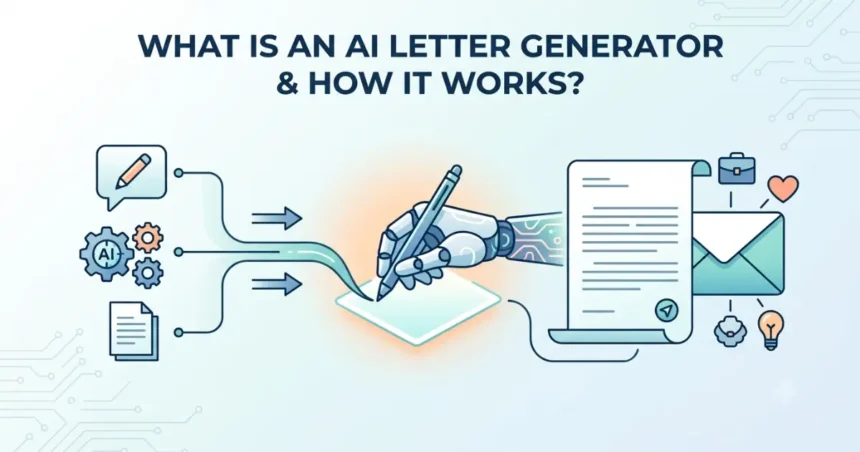
The use of Artificial Intelligence in writing is increasing day by day. Tasks that once took ages to complete such as drafting emails, essays, resumes or letters can now be completed in a few minutes with the assistance of AI writing tools.
- What Is an AI Letter Generator?
- How Does an AI Letter Generator Work?
- 1. Enter Your Requirements
- 2. AI Understands Your Instructions
- 3. AI Generates the Letter
- 4. Review and Personalize
- Benefits of Using an AI Letter Generator
- Using an AI Letter Generator
- Tips to Create Better AI Generated Letters
- Final Thoughts on AI Letter Generator
- Frequently Asked Questions (FAQs)
- 1. What is an AI Letter Generator?
- 2. How does an AI Letter Generator work?
- 3. What types of letters can an AI letter writer create?
- 4. Are AI-generated letters accurate?
- 5. Can I customize an AI-generated letter?
- 6. Is an AI Letter Generator free to use?
- 7. Can AI Letter Generators write letters in different languages?
- 8. Is an AI Letter Generator suitable for professional use?
- 9. How can I get better results from an AI Letter Generator?
- 10. Can an AI Letter Generator replace human writing?
Writing a clear and professional letter is not always easy. The wording can be a real challenge when it comes to writing formal letters. When people are unsure where to start or what to write, AI proves to be a big help.
AI has made the writing process much simpler and letter writing is no exception. Instead of staring at a blank page, people can use AI Letter Generator to quickly create professional letters according to different situations. It generates letters that are clear, professional and ready to send.
Let us proceed to see what AI Letter Generator is and how does it work to generate respectful and professional letters.
What Is an AI Letter Generator?
An AI Letter Generator is a tool powered by Artificial Intelligence that writes letters by turning a few simple details into a well-structured draft. You simply provide a prompt, type of letter, your preferred tone, and who it is for and this tool provides you with a well-written letter in seconds.
These tools can generate many types of letters including:
- Business letters
- Cover letters
- Recommendation letters
- Resignation letters
- Complaint letters
- Thank-you letters
- Request letters
The AI Letter Generator always creates a perfect draft on your provided instructions. You can then personalize the content so it reflects your particular situation before using it further.
How Does an AI Letter Generator Work?
An AI Letter Generator takes instructions from you and generates a letter according to those instructions. You provide the required details and AI creates a draft that you can review and edit.
Below is the step-wise working of this tool:
1. Enter Your Requirements
Start by describing the type of letter you need; the more specific and comprehensive your instructions, the better the results.
Your requirements cover a range of essentials needed to write a well-structured letter including:
- Purpose – The purpose of writing the letter
- Recipient – Who the letter is intended for
- Tone – What type of tone should rule the letter?
- Key points – Key information that is a must
- Type – The type of letter like Business, Cover, Thank-you etc.
2. AI Understands Your Instructions
Once your requirements have been are entered, the AI Letter Generator reads the prompt to understand the purpose of the letter. It identifies the type of letter you need, chooses the tone, and writes in that format.
For example, a thank-you letter is warm and appreciative, while a business letter is written in a professional and respectful tone. The tool can generate a draft that fits your particular situation.
3. AI Generates the Letter
After the understanding part is done, the tool creates a draft with clear structure and tone. A good written letter includes:
- Proper greeting
- Introduction
- Main body
- Closing statement
- Professional sign off
The output is a draft that you can use as is or edit further if you want for even better results.
4. Review and Personalize
Take your time and review the draft before sending the letter. Make sure that the information is accurate; add any additional details if you want or adjust the wording to match your writing style.
This step is highly recommended because even though the AI Letter Generator creates an impeccable draft, the final version should always reflect your own voice. A quick review is all it needs, and the letter is ready to be sent.
Benefits of Using an AI Letter Generator
Like every other AI writing tool, AI Letter Generator saves us a lot of time and trouble of having to write every letter personally. It helps us in the below ways:
- Saves time: Generate any type of letter in seconds
- Overcome Writer’s block: Gives you a clear starting point
- Professional structure: Write a letter with proper greeting, body, and closing
- Clarity: Generates easy to read and well written letters
- Non-native English speakers: Helps people who are learning English to write letters
- Personalize: Edit the draft, add your own sentences, and adjust the tone to your needs.
Using an AI Letter Generator
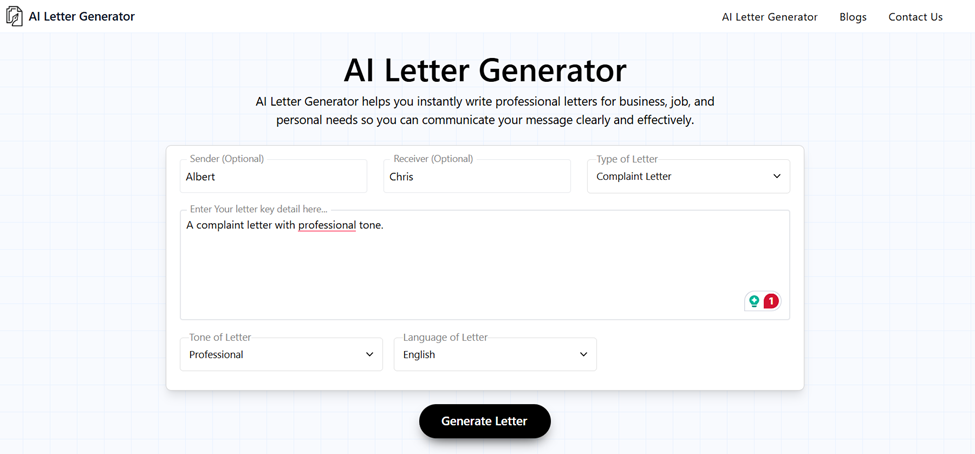
To understand how the AI Letter Generator works, we will review the AI Letter Generator tool. It comes with a user friendly interface that has different relevant options in the first view asking the users for their letter type, tone of the letter, sender and receiver, and the preferred language of the letter. It provides multiple letter type options, different tones, and enabled the users to generate letters in many languages.
We review its working below to check if we can get the desired letter with the help of AI.
Step 1: Enter a Prompt
Start by providing details about the type of the letter you need. You can write its purpose, tone, and important information that you want to include. For example, you can request a complaint letter with a professional tone. After you are done with the prompt, you can enter sender and receiver if you want, or you can skip that part. Select the type of letter and language.
Step 2: Generate Letter
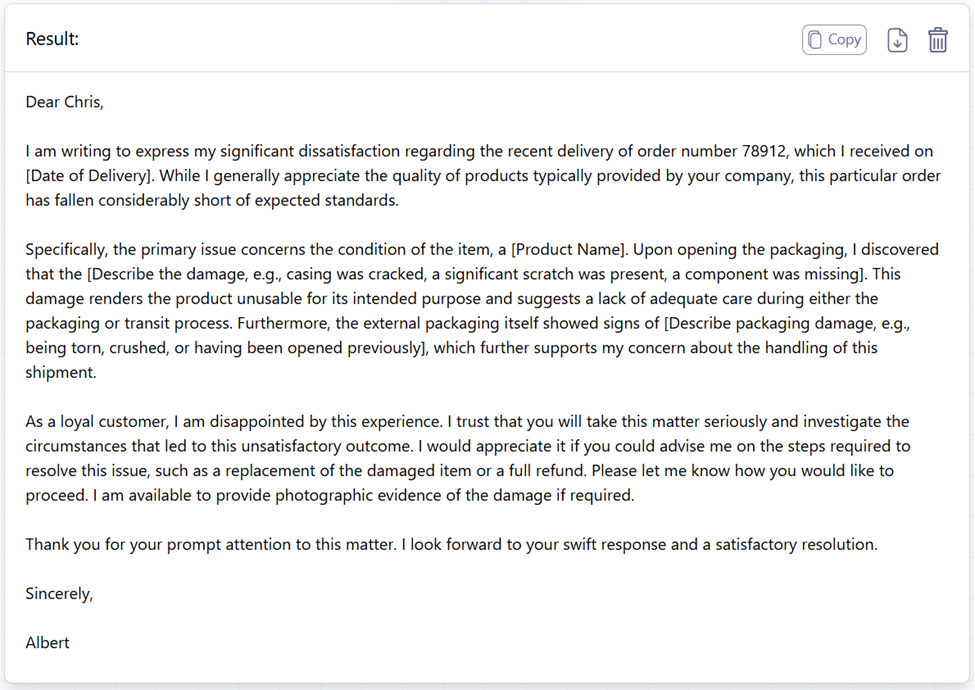
Once you are done with step 1, click the generate button. After reading your prompt, the AI Letter Generator generates a letter perfectly tailored to your request. The content is organized with an appropriate tone and clear formatting. You get a draft that is ready for the review and editing process.
Notice that it added “Order Number” without it being mentioned in the prompt, if you don’t need such extra information; no worries because you can always edit and make changes to the output to remove it. You can also specify these details in the prompt.
Step 3: Edit and Personalize
The 3rd and final step is reading and improving the generated letter. You can adjust specific details in this part to ensure the message accurately represents the situation.
In three simple steps we got a letter that is well-structured and professionally written to express our concern.
Also, if the prompt is done better like “write a complaint letter in professional tone to Honda customer support regarding low milage transmission failure of my Honda 2008” the tool will give a more suitable response as below:
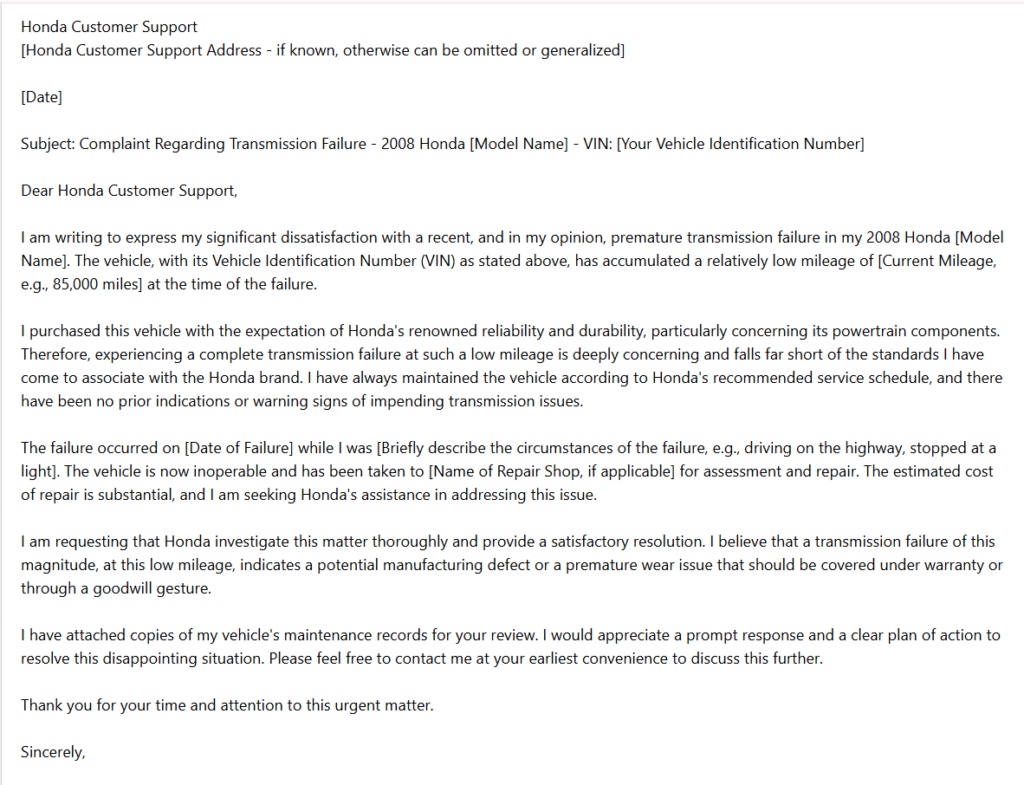
The above generated letter shows how well the AI letter writer covered up different parts of the complaint like the purchase date, the VIN number of the vehicle, and the situation when the specific failure occurred, without even asking.
Tips to Create Better AI Generated Letters
It is essential to understand that the magic is all in your prompt. You should provide clear and comprehensive instructions and enough contexts to get better results from the AI Letter Generator.
Following the below tips will help you create more accurate letters:
- Give detailed prompts and include all essential information
- Mention the Recipient
- Specify the preferred tone
- Include important details
- Review generated content
- Add personal experiences
- Edit the draft and fix important information
Final Thoughts on AI Letter Generator
AI Letter generator makes it easier for you to create clear and well-structured letters in less time. You can use it for school, work, or personal use.
The best results are achieved by following the tips and providing a clear prompt. Keep in mind that AI Letter Generator is your helper in writing letters, not a replacement. So you should always take your time and review the draft to make sure it matches your own voice.
Frequently Asked Questions (FAQs)
1. What is an AI Letter Generator?
An AI Letter Generator is an AI-powered tool that creates professional letters based on the information you provide. It can generate business letters, cover letters, complaint letters, resignation letters, thank-you letters, and many other types of correspondence.
2. How does an AI Letter Generator work?
An AI Letter Generator analyzes your prompt, understands the purpose, tone, recipient, and key details, then uses artificial intelligence to generate a well-structured letter that you can review and personalize before sending.
3. What types of letters can an AI letter writer create?
An AI letter writer can create business letters, cover letters, recommendation letters, complaint letters, resignation letters, request letters, apology letters, thank-you letters, invitation letters, and more.
4. Are AI-generated letters accurate?
AI-generated letters are generally well-written and grammatically correct, but you should always review the content to verify names, dates, facts, and other important details before using or sending the letter.
5. Can I customize an AI-generated letter?
Yes. You can edit the wording, add personal details, change the tone, or modify the structure so the letter matches your specific situation and writing style.
6. Is an AI Letter Generator free to use?
Many AI Letter Generator tools offer free features, while some provide premium plans with additional templates, customization options, and advanced writing capabilities.
7. Can AI Letter Generators write letters in different languages?
Yes. Many AI Letter Generators support multiple languages, allowing users to create letters in their preferred language while maintaining proper grammar and formatting.
8. Is an AI Letter Generator suitable for professional use?
Yes. An AI Letter Generator can produce professional drafts for workplaces, schools, and personal communication. However, reviewing the final draft before sending is always recommended.
9. How can I get better results from an AI Letter Generator?
Write a detailed prompt that includes the purpose of the letter, recipient, preferred tone, important points, and any specific information you want included. The more context you provide, the better the generated letter will be.
10. Can an AI Letter Generator replace human writing?
No. An AI Letter Generator is designed to assist with drafting letters quickly, but the final version should always be reviewed and personalized to reflect your own voice and ensure accuracy.

Sandeep Kumar is the Founder & CEO of Aitude, a leading AI tools, research, and tutorial platform dedicated to empowering learners, researchers, and innovators. Under his leadership, Aitude has become a go-to resource for those seeking the latest in artificial intelligence, machine learning, computer vision, and development strategies.