OpenAI Introduces Dots, Always-On AI Agents Designed to Manage Complex Workflows
OpenAI has introduced Dots, a new type of always-on AI agent designed to help users manage ongoing projects, coordinate work across connected applications, and complete complex tasks with less manual supervision. Announced on September 29, 2026, the capability represents OpenAI’s push to move beyond conversational AI toward systems that can take responsibility for work and continue making progress between interactions.
- OpenAI Introduces Dots, Always-On AI Agents Designed to Manage Complex Workflows
- What Are OpenAI Dots?
- How Do OpenAI Dots Work?
- 1. GPT-6 Astra Powers the Agents
- 2. Each Dot Has Its Own Cloud Computer
- 3. Connected Apps Provide Additional Capabilities
- 4. Dots Continue Working Between Conversations
- Key Features of OpenAI Dots
- What Can OpenAI Dots Do? Five Practical Use Cases
- 1. Automate Software Development Tasks
- 2. Manage Product Launches
- 3. Support Research and Data Analysis
- 4. Prepare Sales Proposals and Business Documents
- 5. Assist with Content Creation and Marketing
- OpenAI Dots Safety, Privacy, and User Controls
- Custom Rules and Permissions
- Proactive Research Has Restrictions
- Actions May Require Approval
- How Does OpenAI Use Dot Data?
- OpenAI Dots Availability and Pricing
- Try your dot
- What Are Specialist Dots for Businesses?
- What OpenAI Dots Could Mean for the Future of AI
- Conclusion
- Frequently Asked Questions About OpenAI Dots
- 1. What are OpenAI Dots?
- 2. How are Dots different from ChatGPT?
- 3. Are OpenAI Dots free to use?
- 4. Which apps can OpenAI Dots use?
- 5. Can OpenAI Dots work without human supervision?
- 6. Are OpenAI Dots available to all ChatGPT users?
- 7. Are OpenAI Dots safe for business use?
- 8. What are specialist Dots?
- 9. Can OpenAI Dots help with content marketing?
- 10. How can I get started with OpenAI Dots?
According to OpenAI’s official announcement, Dots are powered by GPT-6 Astra and operate through their own cloud-based computers. They can use connected applications, access relevant context from ChatGPT memory, and work toward goals defined by users. Rather than responding only when prompted, a Dot can plan subsequent steps, perform work in the background, and return completed tasks or decisions for review.
The company says Dots can support activities ranging from software development and research to content production, sales preparation, and project coordination. Users retain control over connected applications, permissions, and the actions an agent may perform independently.
OpenAI is rolling out Dots to eligible subscribers, with availability varying by plan and market. The company is also previewing specialist Dots designed for defined responsibilities within organizations.
What Are OpenAI Dots?
OpenAI Dots are persistent AI agents built to handle ongoing responsibilities instead of operating only within a single chat session.
A conventional chatbot typically answers questions, generates text, or helps users solve a specific problem. Dots are designed to take a broader goal, determine the steps required, use connected tools to carry out the work, and maintain progress between conversations.
For example, a user managing a product launch could ask a Dot to track changing requirements, update launch documents, prepare revised marketing materials, and identify outstanding decisions. The agent can continue working as new information becomes available, then present its results for review.
OpenAI describes Dots as an extension of the user, adapting to their preferences, goals, and working standards over time. The system uses context from ChatGPT memory and feedback from previous interactions to help tailor its work. Users can also specify which applications an agent can access and establish rules for when it must seek approval.
Dots are therefore intended to function as ongoing digital collaborators, rather than simply another interface for asking an AI model questions.
How Do OpenAI Dots Work?
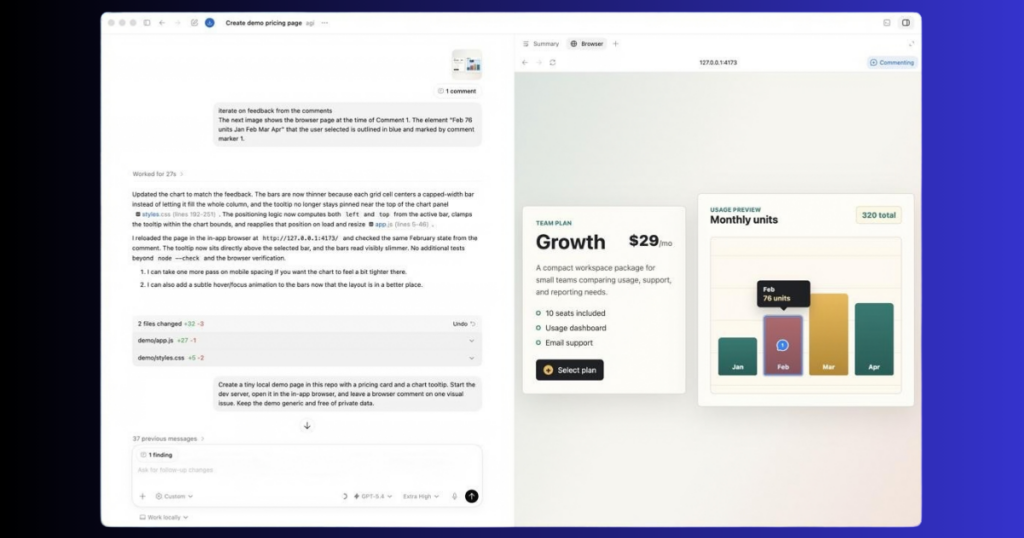
Dots combine an AI model, a cloud-based computing environment, connected applications, and user-defined permissions. According to OpenAI, their operation includes several important elements.
1. GPT-6 Astra Powers the Agents
OpenAI identifies GPT-6 Astra as the model powering Dots. The model provides the intelligence needed to understand instructions, work through complex problems, use computer-based tools, and coordinate multistep tasks.
The agent uses this intelligence to translate a user’s objective into practical actions. Depending on the task, that could involve reviewing documents, analyzing information, preparing code, or updating project materials.
2. Each Dot Has Its Own Cloud Computer
Dots use their own cloud-based computing environment and browser to carry out work. Users can inspect the agent’s computer and monitor its activities.
OpenAI also says users can grant a Dot permission to connect to their own computer. That connection is optional, and the user’s computer remains separate unless they choose to connect it.
This approach allows an agent to work on tasks without requiring the user to supervise every individual step.
3. Connected Apps Provide Additional Capabilities
Dots can use applications connected through OpenAI’s ecosystem of plugins. The company says its ecosystem supports more than 4,000 apps.
OpenAI highlights integrations and communication options involving ChatGPT, Slack, and Microsoft Teams. Depending on permissions and available integrations, an agent can use relevant project information, coordinate tasks, and prepare work across different tools.
The availability of individual integrations and actions depends on the connected service and the permissions granted.
4. Dots Continue Working Between Conversations
One of the central features is the ability to keep projects moving after a user steps away.
A Dot can identify the next steps, work on several tasks, investigate new information, and return updates or questions when human judgment is needed.
Users can communicate with their agents through ChatGPT on supported desktop and mobile experiences, as well as through Slack and Teams. OpenAI says text messaging is planned for a later release.
Key Features of OpenAI Dots
The following table summarizes the main capabilities described in OpenAI’s announcement.
| Feature | What It Does |
|---|---|
| Always-on operation | Continues working toward assigned goals between conversations. |
| Cloud computer | Provides a separate environment for computer-based tasks. |
| App integrations | Uses connected applications within granted permissions. |
| Personalized context | Uses ChatGPT memory and feedback to adapt its work. |
| Multistep execution | Breaks broader goals into actions and coordinates the steps. |
| Progress monitoring | Lets users inspect activity and redirect work. |
| Custom Rules | Allows users to permit, restrict, or require approval for actions. |
| Human review | Returns results and decisions that need user judgment. |
These features are intended to reduce the amount of manual coordination involved in recurring and complex work. However, they do not mean every task can be completed perfectly or without oversight. OpenAI advises users to review consequential work because Dots can still make mistakes.
What Can OpenAI Dots Do? Five Practical Use Cases
OpenAI’s announcement presents examples across software development, product launches, scientific research, sales, and content creation. These examples illustrate intended uses, rather than guarantees that every workflow will produce the same results.
1. Automate Software Development Tasks

Developers can assign a Dot responsibility for investigating bug reports, identifying recurring customer requests, preparing code changes, and testing smaller improvements.
The agent can then prepare a pull request for a developer to review. OpenAI also describes scenarios in which Dots help map dependencies during API migrations and track the work required to move software away from an older interface.
This could help development teams spend less time on repetitive maintenance while retaining human review of proposed changes.
2. Manage Product Launches
Product launches often require teams to coordinate messaging, creative assets, documentation, and changing requirements.
OpenAI says Dots can learn a project’s audience and communication standards, identify the implications of scope changes, and prepare revised launch materials.
For example, when a product requirement changes, an agent could update relevant documents and draft new assets for the team to inspect. The goal is to keep project materials aligned without requiring someone to manually coordinate every revision.
3. Support Research and Data Analysis
Researchers and analysts frequently repeat calculations, update figures, and revise explanations as new evidence becomes available.
A Dot can be assigned to monitor incoming information, rerun analyses, investigate unexpected results, and prepare updated figures or supporting explanations.
OpenAI’s example describes a scientist returning to work that reflects the latest available evidence, with findings that need human attention clearly identified. Researchers would still need to validate calculations, assess evidence quality, and determine whether conclusions are justified.
4. Prepare Sales Proposals and Business Documents
Business development teams often need to compare customer requirements with product documentation, identify missing information, and update proposals as discussions progress.
OpenAI describes Dots checking requirements against product documentation and account history, identifying testing needs, and preparing evaluation plans.
An agent could also help assemble an integration demonstration or revise a proposal when requirements change. Sales professionals would remain responsible for approving commitments and handling important customer decisions.
5. Assist with Content Creation and Marketing

Content teams could use Dots to turn interview transcripts into show notes, identify potential video clips, and draft social media posts.
OpenAI says Dots can adapt to a creator’s voice and audience, apply feedback across related materials, and use previous edits to improve subsequent work.
For a publication such as Aitude, a comparable workflow could involve preparing draft social posts from an approved article, organizing editorial tasks, and updating promotional materials when an article changes. This is a potential application of the announced capabilities, not a claim that Aitude has tested or integrated Dots.
Editors would still need to verify facts, review brand consistency, and approve material before publication.
OpenAI Dots Safety, Privacy, and User Controls
Autonomous AI agents can access information and perform actions across connected services, making permissions and safeguards important parts of their design.
OpenAI says Dots build on ChatGPT’s existing protections with additional controls for their computer-based work and connected applications.
Custom Rules and Permissions
Users choose which applications a Dot can access and can define additional rules to permit certain actions, require approval, or block actions altogether.
The agent’s access is governed by the permissions granted to it. Connecting an application does not mean every possible action within that application is automatically authorized.
Proactive Research Has Restrictions
OpenAI describes a feature called proactive research, through which Dots can look for useful information in connected sources while users are away.
The company’s documentation says these background research tools are restricted to read-only access. They cannot directly send messages, change content through plugins, or control a browser or computer. Any follow-up action remains subject to the relevant action rules and safety checks.
Actions May Require Approval
Dots use an automated review process to check certain planned actions against user instructions, Custom Rules, and safety requirements.
Some actions require approval, while sensitive tasks, such as changing a password, remain under the user’s control. OpenAI also says its safeguards help detect malicious instructions and potentially harmful behavior.
These protections reduce risks but cannot eliminate them. Users should continue to inspect important work, especially when it involves external communications, business records, sensitive data, or consequential decisions.
How Does OpenAI Use Dot Data?
OpenAI says it does not use information from ChatGPT Business, Enterprise, or Edu workspaces to train its models by default.
For personal ChatGPT plans, whether eligible conversations and work may be used to improve models depends on the user’s data-control settings. OpenAI also distinguishes proactive background research and the agent’s internal notes from eligible conversations or tasks informed by that research.
Users should review the official Dots privacy and security guidance before connecting accounts that contain confidential information.
OpenAI Dots Availability and Pricing
OpenAI says Dots are rolling out to eligible ChatGPT users, with availability depending on the subscription plan, supported market, and workspace settings.
- ChatGPT Pro: Rolling out in eligible markets. Check OpenAI’s current availability information for regional restrictions.
- Business Premium: Access is rolling out gradually in supported regions.
- Enterprise and eligible organizational workspaces: Beta access is available when the workspace administrator enables it.
For the latest details, see OpenAI’s official getting-started documentation.
OpenAI says a user’s first Dot is included in eligible Pro and Business Premium subscriptions at no additional cost. The company has also stated that it plans to expand access to more users.
Usage allowances and limits may vary. Check the current plan terms for the applicable allowance and any temporary launch-period arrangements. Tasks initiated or managed through Codex or ChatGPT Work may count toward the applicable usage limits as usual.
Availability is being rolled out gradually, so eligible subscribers may not see the feature immediately. Users can check the official Dots page and the getting-started guide for current access information.
Try your dot
What Are Specialist Dots for Businesses?
Alongside personal agents, OpenAI has previewed specialist Dots for organizations.
These agents are designed to take responsibility for defined business functions using their own identities, credentials, and access to the systems required for their assigned work.
OpenAI says its early testing has covered areas including procurement, invoice processing, email marketing, customer support, and commercial contracting. The company is beginning with focused enterprise pilots, working directly with organizations to define responsibilities, tool access, and approval processes.
OpenAI is also working with Microsoft to integrate specialist Dots with Microsoft Agent 365, with the goal of allowing businesses to manage the agents through existing governance and security tools.
This enterprise-focused approach could allow companies to deploy multiple specialized agents rather than expecting one general-purpose assistant to handle every responsibility. However, the announcement describes an early-stage rollout, not universal availability of specialist agents across all businesses.
What OpenAI Dots Could Mean for the Future of AI
Dots reflect a broader shift in how AI products are designed. Instead of focusing exclusively on generating answers, AI systems are increasingly being developed to plan, use tools, perform sequences of actions, and manage work over time.
For businesses, this approach could reduce repetitive coordination and help teams keep projects updated as information changes. For developers, it could provide support for testing, maintenance, and routine coding tasks. For content teams, it could help connect research, drafting, and distribution into a more continuous workflow.
At the same time, greater autonomy creates practical questions about reliability, permissions, accountability, and data access. Organizations will need to establish clear rules for what agents can do independently and which decisions require human approval.
OpenAI’s documentation acknowledges that Dots can make mistakes and recommends reviewing consequential work. Their usefulness will therefore depend not only on model capabilities but also on the quality of connected data, the permissions granted, and the oversight built into each workflow.
For users evaluating Dots, a practical starting point is to assign a clearly defined, low-risk responsibility, review the results, and expand access only when the workflow proves reliable.
Conclusion
OpenAI Dots introduce an always-on approach to AI assistance, combining GPT-6 Astra, cloud-based computing, connected applications, and user-defined controls. The agents are designed to keep projects moving between conversations and help users manage work across software development, research, marketing, sales, and business operations.
The initial rollout is limited by subscription eligibility, supported markets, and organizational settings. Although Dots offer a new way to delegate multistep tasks, they do not remove the need for human judgment or verification.
As OpenAI expands access and develops specialist agents for businesses, the key question will be how reliably these systems can handle real responsibilities while remaining within clearly defined safety and privacy boundaries.
Follow Aitude for more updates on AI agents, automation tools, and emerging AI technologies.
Frequently Asked Questions About OpenAI Dots
1. What are OpenAI Dots?
OpenAI Dots are always-on AI agents designed to manage ongoing tasks, use connected applications, and make progress toward user-defined goals between conversations. They are powered by GPT-6 Astra and operate through their own cloud computers.
2. How are Dots different from ChatGPT?
ChatGPT can answer questions and assist with individual tasks. Dots are designed to take responsibility for ongoing projects, determine the next steps, use connected tools, and continue working between conversations while following user-defined permissions.
3. Are OpenAI Dots free to use?
A user’s first Dot is included at no additional cost with eligible ChatGPT Pro and Business Premium plans. Enterprise users can access the beta when their workspace administrator enables it. Availability and usage allowances depend on the plan and supported market.
4. Which apps can OpenAI Dots use?
OpenAI says its plugin ecosystem supports more than 4,000 applications. Dots can work with supported connected tools and communicate through ChatGPT, Slack, and Microsoft Teams. Actual capabilities depend on the integrations available and the permissions granted.
5. Can OpenAI Dots work without human supervision?
Dots can continue working on assigned goals between conversations and perform permitted tasks independently. However, some actions require approval, sensitive tasks remain under user control, and important results should be reviewed.
6. Are OpenAI Dots available to all ChatGPT users?
No. The initial rollout targets eligible Pro and Business Premium users, with Enterprise beta access controlled by workspace administrators. Availability varies by market and is being expanded gradually.
7. Are OpenAI Dots safe for business use?
OpenAI provides permission controls, Custom Rules, automated action reviews, and safety monitoring. These measures help reduce risks but do not guarantee that every action will be correct or safe. Businesses should evaluate agents carefully before connecting sensitive systems.
8. What are specialist Dots?
Specialist Dots are organizational agents designed for specific responsibilities, with their own identities, credentials, and access to required business systems. OpenAI is starting with focused enterprise pilots and is working with Microsoft on integration with Agent 365.
9. Can OpenAI Dots help with content marketing?
Yes. OpenAI describes workflows in which Dots turn interview transcripts into show notes, identify potential video clips, and draft social posts. Content teams can adapt these capabilities to editorial and promotional workflows, with human review before publication.
10. How can I get started with OpenAI Dots?
Eligible users can create their first Dot through the ChatGPT desktop app or desktop browser. They can then connect supported applications, set permissions, and assign a goal. Read the official getting-started guide.

Sandeep Kumar is the Founder & CEO of Aitude, a leading AI tools, research, and tutorial platform dedicated to empowering learners, researchers, and innovators. Under his leadership, Aitude has become a go-to resource for those seeking the latest in artificial intelligence, machine learning, computer vision, and development strategies.