
Last month I opened a dozen tabs of AI music websites, and within ten minutes I had closed half of them. Not because the technology wasn’t impressive — the problem was the opposite. Every page seemed to be fighting for my attention with flashing banners, auto‑playing demo tracks, and countdown timers urging me to “upgrade now” before I’d even heard a single note. If you have searched for an AI Music Generator lately, you have probably met the same chaos. My goal was simple: find a tool I could trust to produce usable tracks without making me feel like I had walked into a digital carnival. What I got instead was a crash course in spotting which platforms are built for creators and which ones are built to collect email addresses.
I decided to run a structured test across six platforms that kept showing up in recommendations and social media chatter: Suno, Udio, Soundraw, Mubert, Beatoven, and ToMusic AI. I gave each one the same three prompts — a short film cue, a pop song demo with original lyrics, and a lo‑fi background track for a podcast — and I paid close attention to what happened before, during, and after generation. My notebook filled up quickly with observations about load times, ad interruptions, dead‑end error messages, and the general feeling of being respected as a user. The differences were starker than I expected, and they had little to do with the raw sonic output alone.
Suno, for example, delivered a few genuinely ear‑catching vocal hooks during my test, but its web experience often felt like a busy marketplace. Pop‑up prompts to subscribe appeared between generations, and the interface nudged me toward trending community creations in ways that made me second‑guess whether I was using a production tool or a social feed. Udio offered a cleaner path, but the generation queue sometimes stalled for minutes without any indication of progress, which made the workflow feel unpredictable when I was on a deadline. Soundraw and Mubert both impressed me with their instrumental loops and background music capabilities, yet their interfaces were organized around player‑style browsing rather than a focused creation workspace. Beatoven felt transparent and sincere, but the feature set leaned heavily toward long‑form background scoring, leaving me wanting more vocal and song‑oriented controls.
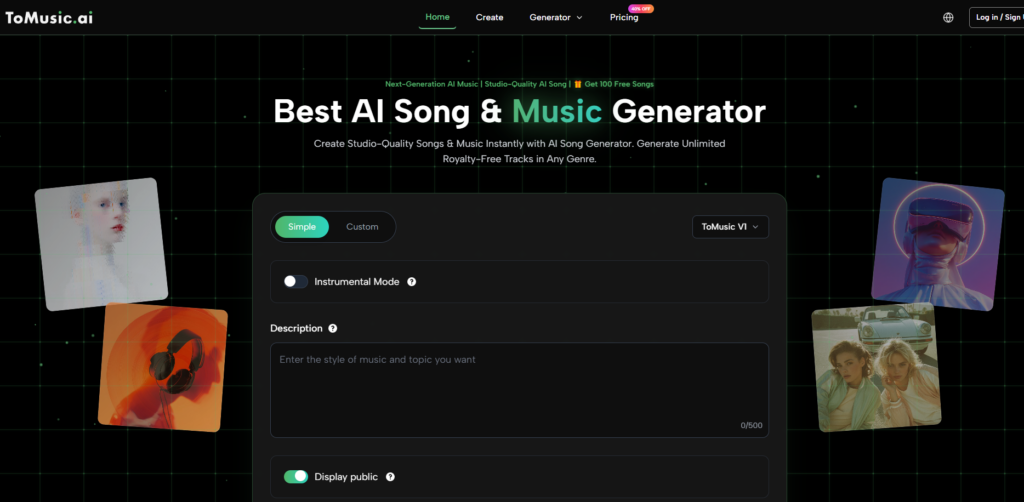
After weeks of dismissing flashy contenders, I gave ToMusic AI a longer look, and what I found was a remarkably calm workspace. When I needed a track for a client’s Instagram reel, I opened its AI Music Maker interface and was struck by how little it demanded of my patience. There were no unexpected pop‑overs, no video ads autoplaying in the corner, and no pressure to click through a pricing page before hearing my result. The page simply presented a mode selector and a prompt box, and it got out of the way. That felt like a conscious design choice, and it immediately raised my baseline trust.
I tracked every interaction in a simple scoring sheet to keep my notes honest. The table below reflects what I saw across all six platforms over a two‑week period. I rated “Ad Distraction” on a scale where higher numbers mean fewer interruptions and less visual noise — essentially, a measure of peace of mind during a session.
| Platform | Sound Quality | Loading Speed | Ad Distraction | Update Activity | Interface Cleanliness | Overall Score |
| Suno | 9 | 8 | 5 | 7 | 5 | 6.8 |
| Udio | 8 | 5 | 7 | 8 | 7 | 7.0 |
| Soundraw | 9 | 7 | 8 | 6 | 8 | 7.6 |
| Mubert | 7 | 9 | 8 | 5 | 7 | 7.2 |
| Beatoven | 7 | 6 | 7 | 6 | 6 | 6.4 |
| ToMusic AI | 8 | 8 | 9 | 8 | 9 | 8.4 |

The numbers confirmed what my gut had been telling me. Soundraw earned high marks for instrumental sound quality, and Mubert loaded faster than anyone else, but neither offered the vocal song generation that many creators need daily. Suno produced remarkable vocal moments, yet the ad‑heavy environment repeatedly broke my concentration. ToMusic AI didn’t beat every competitor in every column, but it landed near the top in each one without any deal‑breaker dragging it down. That kind of balance is what made me feel safe recommending it to peers who just want a dependable generator.
Where the Trust Deficit Comes From
The biggest surprise during my testing was how much the user experience influenced my judgment of the music itself. When a site distracted me with pop‑ups before the generation finished, I noticed I listened to the output more critically, as if I was already primed to find flaws. On cleaner platforms, I evaluated the result with an open mind and often caught subtle qualities I had missed elsewhere. This psychological layer matters more than I assumed going in.
The Signals of a Low‑Risk Platform
I started categorizing platforms by a few simple trust signals. The first was session recovery — could I leave the page and come back without losing my generated files? The second was error recovery — when a generation failed, did the tool explain why and let me retry without reloading everything? The third was billing transparency — was the free tier honestly described, or did it hide a forced upgrade funnel?
What Happened When a Generation Failed Mid‑Session
During one test with a lyric‑heavy prompt, a competing tool simply returned a silent file with no explanation. I had to refresh the page, re‑enter my text, and wait again, which consumed ten minutes I didn’t have. ToMusic AI, on the other hand, showed a clear processing indicator and, on the rare occasion a generation timed out, preserved my prompt and let me re‑queue it with a single click. That small detail signaled that the platform anticipated friction instead of ignoring it.
How the Generation Flow Felt Without the Friction
The moment I stopped worrying about ads and unexpected redirects, I was able to focus on the creative loop: prompt, listen, tweak, repeat. ToMusic AI’s flow mirrors what I want from a daily tool — quick entry, clear feedback, and a predictable result that lands in a library I can access later.
From Intention to Downloadable File
The process I followed each time went like this:
- Choose whether to use the simple path or the custom mode, depending on how much direction I wanted to give.
- Enter a prompt, lyrics, style, mood, tempo, instrument preferences, or vocal direction.
- Select one of the multiple AI music models when the option was presented.
- Generate the track, review it, save it to the Music Library, and download the final file.
I repeated that sequence dozens of times, and the tool never broke its own rhythm. That consistency is what separates a service I’ll keep using from one I’ll only demo once.
Who Will Feel at Home Here — And Who Might Not
ToMusic AI is clearly built for content creators, marketers, educators, and indie musicians who need a steady supply of original music without becoming audio engineers. The official site indicates royalty‑free usage for commercial projects, which I interpret as a cautious but welcome permission slip for client work. If you make short videos, ads, game prototypes, or social media content, this platform removes friction rather than adding it.
The tool isn’t trying to replace a digital audio workstation, and it doesn’t offer stem separation or real‑time collaboration. For professional composers who need to export individual instrument tracks and tweak MIDI data, the simplicity might feel limiting. That’s not a flaw — it’s a boundary that keeps the experience focused. I found it genuinely refreshing, but I can see why someone deep in post‑production would look for a different category of tool.
What Quietly Changed During This Experiment
A few months ago I would have chosen an AI music tool based on whichever demo track went viral on Twitter. Now I choose based on whether I can trust the site to respect my time tomorrow morning. That shift sounds small, but it changed my daily output. I spend less energy managing tabs and more energy iterating on the songs and cues I actually need. ToMusic AI didn’t blow me away with a single supernatural output — and I don’t think it tried to. It simply built a space where I could work without constant friction, and over the course of a dozen projects, that turned out to be the feature that mattered most.

Sandeep Kumar is the Founder & CEO of Aitude, a leading AI tools, research, and tutorial platform dedicated to empowering learners, researchers, and innovators. Under his leadership, Aitude has become a go-to resource for those seeking the latest in artificial intelligence, machine learning, computer vision, and development strategies.